How to Automate Lead Management with WordPress AI Agent


Every business wants to turn more leads into customers. But the truth is that most businesses lose potential customers not because their product is bad, but because they take too long to respond or send generic, impersonal messages.
According to research, you are 21 times more likely to qualify a lead if you respond to them within five minutes. But most WordPress site owners have to sort through form submissions by hand to figure out which leads need to be dealt with right away and which can wait.
This is where lead automation powered by AI makes a big difference. You can set up a smart system that reads lead data, scores them automatically, and takes the right action at the right time, all by itself. Thus, you won’t have to go through every lead submission and write a response.
This guide will show you how to automate lead management with WordPress AI agents. At the end, you’ll have a WordPress setup that automatically finds hot leads, lets your sales team know through their preferred channels, and sends personalized emails based on how good the leads are.
What is Lead Management in WordPress?
Lead management is the process of capturing, tracking, and nurturing potential customers from the moment they show interest in your business until they make a purchase decision.
In WordPress, lead management often starts with automated lead generation forms, which collect data from website visitors. But the challenge doesn’t end there; how you manage that data is what truly makes a difference.
Why Traditional Lead Management Falls Short
Most WordPress sites handle leads the same way they did a decade ago. Someone submits a form, you get an email notification, and eventually, maybe hours or days later, someone from your team responds.
The problems with this approach are obvious:
- Response delays kill conversions: By the time you respond, your lead has already contacted three competitors.
- All leads get treated equally: A CEO looking to spend $50,000 gets the same automated “thanks for your interest” email as someone just browsing.
- Manual sorting wastes time: Your sales team spends hours each week reading through submissions to identify priorities.
- People forget about follow-ups: Leads fall through the cracks when there isn’t a system in place to keep things organized.
What Should Be In Good Lead Management
A good WordPress lead management system does a lot of things automatically:
- Lead capture: Forms that get the right information from visitors without making them feel overwhelmed. Sure, you need data to qualify leads. But not so much that people abandon the form halfway through.
- Lead scoring: Automatically categorizing leads as hot, warm, or cold based on specific criteria. This lets your team focus energy where it matters most.
- Quick Response: Always send personalized emails right away. And the message should be in line with the lead’s level of interest and purpose.
- Team notifications: Letting the right people know through channels they actually use, like Slack, Telegram, and WhatsApp, not just email that gets lost in their inbox.
- Organized tracking: keeping all of your leads’ information in one place so that your team can access it and see the whole conversation history.
Top Lead Management Form Plugins for WordPress
First thing first, everyone needs a good form builder plugin to start building your lead automation system. So, here are the best choices to think about:
- ARForms: Known for its advanced features and friendly user interface. ARForms makes it easy to create lead forms with simple drag-and-drop. It comes with 33+ advanced form fields, extensive styling options and powerful integrations.
- Bit Form: A lightweight & affordable form builder that offers powerful features, including conditional logic, multi-step forms, and 50+ integrations for free.
- Gravity Forms: A feature-rich form builder with advanced capabilities. But Gravity form doesn’t offer a free version, only available through paid plans.
- Contact Form 7: One of the oldest and most popular WordPress form builder plugins, it remains a go-to choice for users who need an easy way to create contact forms or more without requiring advanced features.
What Can You Do with Lead Info?
When you get leads through your forms, the real work starts. Leads can get lost or forgotten if they aren’t handled properly. This is how to handle lead data in the best way:
- Categorize leads by intent and fit: Not every lead is the same. Someone who wants to know how much your business plan costs is very different from someone who downloads a free guide.
- Speed matters more than perfection: One mistake I see all the time is that businesses spend hours coming up with the “perfect” answer while the lead goes to a competitor who answered in minutes.
- Personalization is non-negotiable: People delete emails that say “Thank you for your interest.” Your answer should include specific information from their submission.
- Route leads to the right people: Your top salesperson shouldn’t be answering basic support questions, and your junior team members shouldn’t be handling enterprise leads.
- Follow up with a purpose, not just because you have to: I’ve seen lead automation systems that send seven follow-up emails in just three days. That’s not being persistent; it’s harassment.
How to Automate Lead Management in WordPress
The first step to automating lead management in WordPress is to pick a form builder. A form builder will make it easy for you to collect useful lead information on your website.
Once your form is set up, you can connect it to an automation tool to manage, nurture, and convert leads quickly and easily, without having to do anything by hand.
I chose ARForms for lead generation and Bit Flows for automation to make WordPress lead management easier. This is why:
Why Choose ARForms for Lead Generation
ARForms is an excellent tool for businesses looking to generate high-quality leads. It’s a form plugin that integrates smoothly with WordPress and offers advanced customization features. It makes sure your only forms not only capture information effectively, but also match your site’s style.
Standout Features of ARForms:
- Drag-and-Drop Interface: Create all kinds of online forms with no coding.
- Multi-Step Forms: Split up long forms into smaller, easier-to-understand.
- Conditional Logic: Show/hide fields based on previous answers.
- Built-in popup plugin: Trigger popups like on load, on exit and on timer for better promo.
- Powerful Data Analysis: WordPress lead management goes a long way so analyse all your form entries.
Why Automate Lead Management with Bit Flows
It can take a lot of time to manage and nurture leads after you get them with ARForms. That’s where Bit Flows comes in. Bit Flows is a multi-step workflow automation tool that lets you use your lead data to automate tasks and workflows. You can automatically send leads to the right sales team, let your staff know, and even send personalized follow-up emails without having to do anything.
Here’s Why Bit Flows is Perfect for Lead Management Automation:
- AI-Powered Automation: Traditional automation tools follow rigid “if this, then that” logic. That’s useful but limited. Bit Flows’ AI Agent can actually read and understand lead information, make decisions based on context, and take multiple different actions depending on what it finds.
- Unlimited Integrations: You can send leads where they need to go by connecting with more than 100 apps.
- Instant Notifications: When a new lead is captured or an existing lead needs attention, you’ll get a message on WhatsApp, Telegram, Slack, and other apps.
- Custom Trigger & Action: You can use custom triggers and actions to automate workflows.
- Supported Tools: This plugin allows you to use functions like Router, Delay, Conditions, Image helper, JSON Parser, CSV, XML, Schedule, Iterator, and Repeater, which let you set up advanced lead automation.
Automate Lead Management Using ARForms & Bit Flows AI Agent
Now, let’s look at how to automate the entire lead management process using ARForms and Bit Flows AI Agent.
Step 1: Install ARForms To Create Your Lead Capture Form

From ARForm’s official site, get ARForm Pro or you can also try out the free version. Then simply install ARForms in your WordPress dashboard.
Now you can easily create a lead generation form using its simple drag and drop interface. However, if you don’t wanna make anything from scratch, ARForms comes with over 50+ professional template forms to kickstart your lead generation. You can even customise it completely as you want to match your website’ style.
Here, I have created a lead generation form.
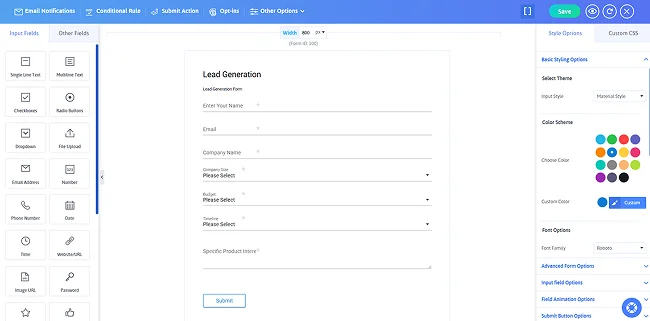
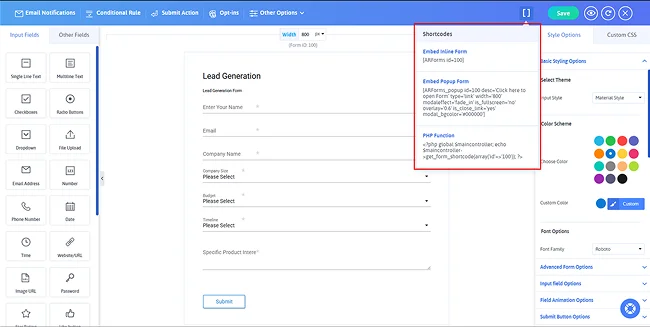
Then copy the shortcode and paste it into any WordPress page or post where you want the form to appear and..That’s it ! Now your lead generation form is ready to go!
Step 2: Install Bit Flows To Create Multi-Step Workflows
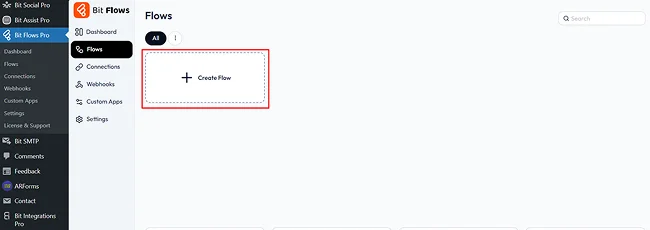
Next, similarly Install Bit Flows plugin & activate it, then go to the plugin dashboard and click on ‘Create Flow’.
Step 3: Set ARForms As The Trigger
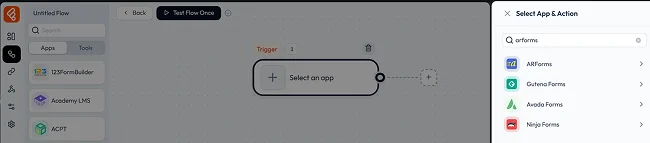
In Bit Flows, you can set ARForms as your trigger by clicking on ‘Select an App’ and searching for ‘ARForms.’
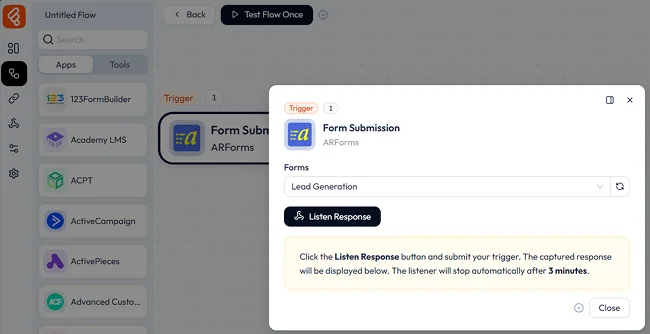
Then, select your form from the dropdown and click on ‘Listen Response’ to capture the submission data.
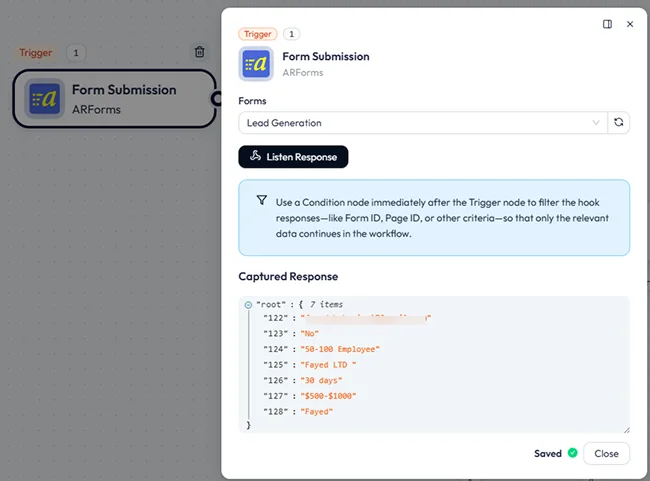
Once the form is submitted, the response is captured.
Step 4: Add an AI Agent Node
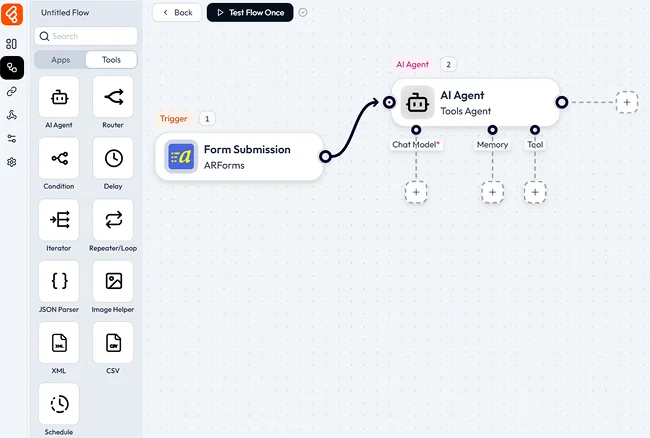
Bit Flows’ AI Agent uses advanced AI models to analyze the incoming lead data. Now, click on the (+) icon and navigate to tools. From there, drag and drop the AI Agent node into your workflow.
Step 05: Set Up the LLM Chain
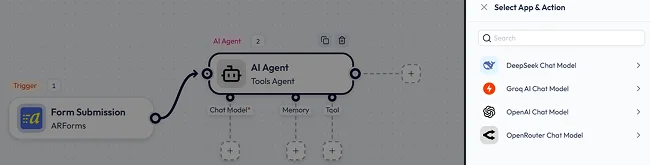
Click on the (+) icon and select a Chat Model, such as OpenAI or DeepSeek. Connect the model to your API key, then choose the preferred model for your task.
If needed, enable Advanced Features to configure additional settings like token limits, temperature, and more.
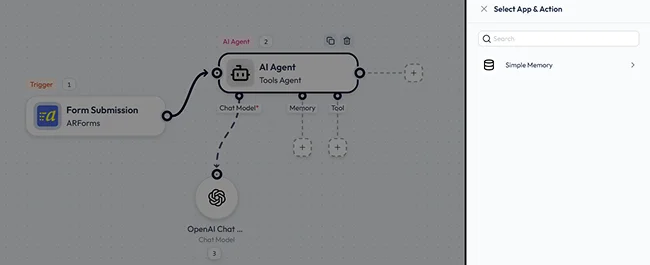
Step 06: Configure Simple Memory (Optional)
If you want the AI Agent to retain information from previous steps (like the customer’s name or a ticket number), enable the Simple Memory node. You can store variables like {customer_name} or any other relevant data. This memory can then be referred to in future prompts or actions.
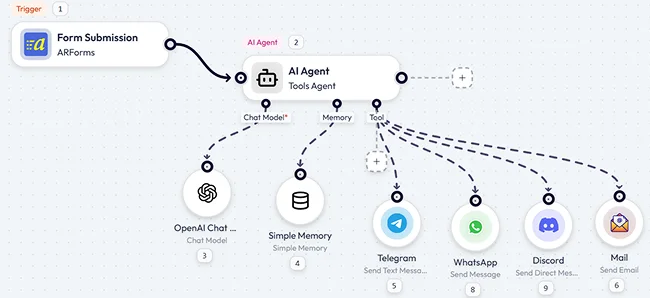
Step 07: Add Tool/Action Calls
Within the AI Agent node, you can access all Bit Flows actions. For example, I’ve routed the data to three different platforms. First, the AI Agent analyzes the form data to understand the user’s intent and sentiment, then performs actions according to the prompt provided.
Step 08: Add Prompts to AI Agent and Tools
Now it’s time to tell the AI Agent what to do. Click on the AI Agent node and add your custom prompts. Don’t forget to set the maximum iteration limits.
Once you’ve configured the prompt, test it by clicking the Test Run button.
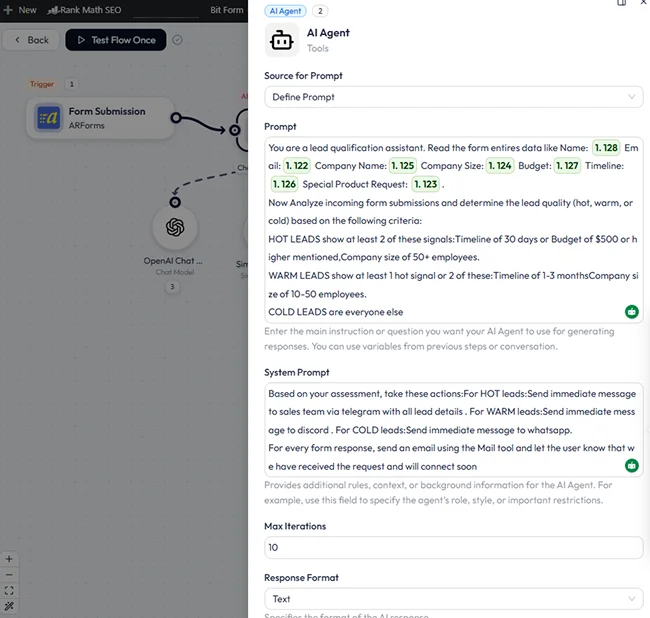
You can also provide a brief description for each tool. I’ve added a description for the Telegram tool, for example.
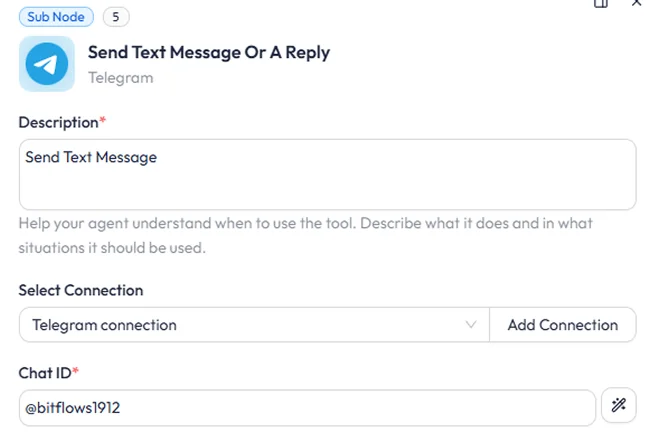
Step 09: Let the AI Agent Decide What Happens
Now comes the fun part: using the AI Agent’s results to map the fields. You don’t have to map each field by hand. Simply click the AI Define icon next to each field, and the AI Agent will figure out what to send for you.

You can also add actions after the AI Agent has done its job. For example, I’ve made a Google Sheet to keep track of each form submission. This is how the final workflow will look.
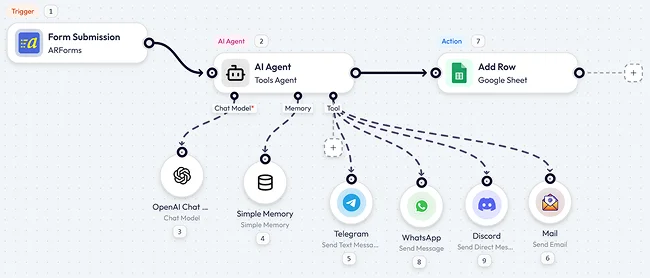
Step 10: Try Out The Workflow
Now, every time a form is sent in, Bit Flows’ AI Agent will look at the data, figure out what the person wants and how they feel, and then automatically choose what to do next.
I sent in a test form to show how it works. Here are the logs of the flow’s execution.

Final Thoughts
Lead management automation isn’t about removing humans from the process. It’s about removing the boring, repetitive parts so humans can focus on the interesting, high-value parts,like actually talking to qualified leads who are ready to buy.
The combination of ARForm with Bit Flows’ AI Agent creates a system that’s both intelligent and practical. You’re not just capturing leads, you’re understanding them, categorizing them, and responding to them in ways that actually match their needs and intent.
So, start simple. Get the basic hot/warm/cold scoring working properly before adding complex multi-step sequences or dozens of integrations. Once you see the system working and saving time, you can expand to more sophisticated workflows.
The businesses winning with lead management aren’t necessarily the ones with the biggest marketing budgets. They’re the ones who respond faster, more personally, and more intelligently than their competitors. Now you have the tools to be one of them.
Recommended Articles:
- What are Lead Forms? Ultimate Guide to Lead Generation Forms
- 10 Online Project Management Tools to Increase Productivity
- 16 Lead Generation Form Examples
FAQs
What is lead management in WordPress?
Lead management in WordPress involves capturing, tracking, and nurturing potential customers using forms and plugins, ensuring that leads are properly categorized and followed up on.
How can I automate lead management in WordPress?
You can automate lead management in WordPress by using plugins like ARForms for form creation and Bit Flows for automation, which integrates lead scoring, notifications, and follow-ups.
How does AI improve lead management?
AI analyzes lead data to understand intent and sentiment, automatically scores leads as hot/warm/cold, and triggers personalized actions based on context. This eliminates manual sorting and ensures quality responses instantly.
Can I automate lead notifications to my team?
Yes, automation tools like Bit Flows send instant notifications through Slack, Telegram, WhatsApp, or email when new leads arrive. You can route different lead types to specific team members automatically.
What is Bit Flows AI Agent?
Bit Flows AI Agent is an intelligent automation tool that reads lead data, makes context-based decisions, and triggers multiple actions automatically. It goes beyond simple “if-then” logic with true AI understanding.
How do I set up automated lead management workflows?
Install ARForms for lead capture and Bit Flows for automation, then create workflows connecting form submissions to AI analysis and automated actions. Map form fields to actions using AI-powered field mapping.
How do I track automated lead management performance?
Use integration with Google Sheets or CRM dashboards to monitor lead volume, response times, and conversion rates. Bit Flows logs show exactly what actions were taken for each lead.