How to Create a Restaurant Online Order Form With ARForms


Ever thought about creating your own restaurant online order form for taking direct takeout orders and food delivery orders online?
Creating an online food order form for your restaurant is way more easier and….profitable than you think. The best part is, you need zero coding skills or complicated setup. Just a powerful WordPress form plugin and you are all good to go!
With ARForms, you can create a complete and effective online order form with payment to let people order from your restaurant online.
In this post, we’ll show you a simple step by step tutorial on how to create a restaurant online order form in WordPress. From setting up food menu, pricings to accepting payments online, ARForms will help you set up all in no time.
So let’s see how you can make that happen with ARForms.
What Is a Restaurant Order Form?
A restaurant order form is an online form that allows your customers to order food directly from your restaurant website.
In simple terms, It works almost the same as a WordPress restaurant ordering system. Customers can select the food menu items, add quantities, special requests and also process online payments.
Thus, if you are looking for a simple solution in place of a complicated WordPress restaurant ordering system, a restaurant order form is the best solution.
By simply adding a take out order form on your business website, you can easily collect and manage your online orders. Moreover, many form plugins such as ARForms smoothly connect with multiple popular payment gateways, offering customers an option to pay online right from the take out order form
Why Use ARForms to Create Your Restaurant Order Form?
Many wonders why go with ARForms to create your own restaurant order form? The answer is simple.
When it comes to online form creation, ARForms is the best WordPress form plugin by offering ease of use, flexibility, extensive styling and effectiveness.
If you already own a WordPress site for your restaurant business, all you have to do is get ARForms by its side to take it to the next level.
Here are some reasons why ARForms is the best for making your restaurant order form:
- Live Drag and Drop Form Builder : You don’t need any coding or tech skills to create your restaurant order form using ARForms live drag and drop form builder
- Powerful Integrations : ARForms comes with over 24+ third party integrations including multiple payment gateways such as PayPal, Stripe, Authorize.net, Razorpay, Mollie and many more.
- Add images and menu variations: Easily embed images of food items as choices in checkboxes to showcase your dishes beautifully
- Conditional & Math Logic: You can create a complete smart and interactive form using conditional logic and Math logic in ARForms
- Notifications: Send instant automatic notifications of order confirmation via Email, SMS or WhatsApp
- Full customization: ARForms offers an extensive set of styling options to personalize your restaurant order form to match your website beautifully
What’s more, it comes with powerful data analysis to keep track of all your orders. Plus, it offers a robust set of other features such as File Upload, Embedded Files, 50+ templates and sample forms, Autosave Form Progress and Auto-Populated Field Values and so much more that makes it perfect for creating a food order form.
So now, without any further ado, let’s hop on straight on the step by step tutorial to create your own restaurant online order form.
How to Create a Restaurant Online Order Form in WordPress (Step-by-Step)
Step 1: Install and Activate ARForms Plugin
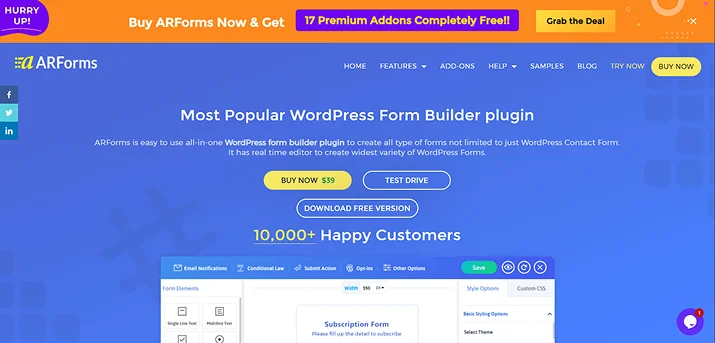
First, head to ARForms official website and download your ARForms favourite version. Once you get the zip file, jump straight to your WordPress dashboard.
Now go to Plugin → Add New → Upload Plugin → Choose File, then simply upload the ARForms zip file.
After that click “Install Now”, followed by Activate.
Once you activate the ARForms plugin, you’ll see the ARForms dashboard right inside your WordPress dashboard.
Still need help? You can check out our friendly user guide to get started with ARForms.
Pro Tip: Go with ARForms Pro to unlock all payment integrations and powerful features for lifetime.
Step 2: Choose a Restaurant Order Form Template
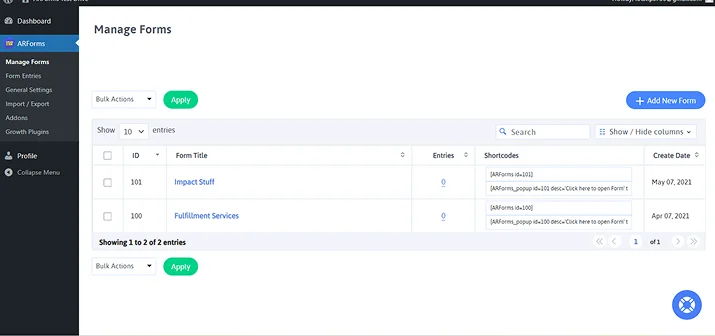
Next, go straight to ARForms →Manage Forms → Add New Form.
Here you’ll see three options to continue before jumping on to ARForms live drag and drop form editor.
- Blank Form
- Templates
- Sample Forms
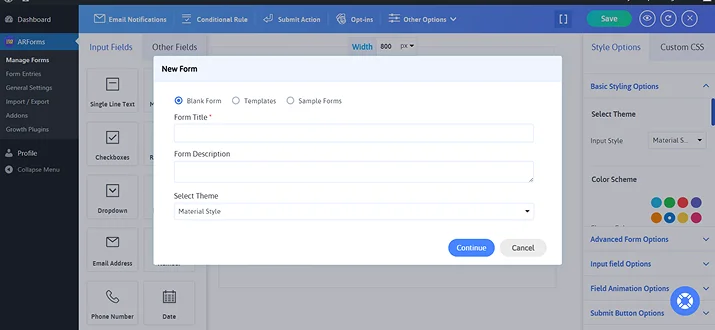
That being said, you’ll get three options here. Either you can make your own restaurant online order form from scratch, go with a pre-built template or just pick a ready to go 50+ sample form and customize it later.
To keep things simple from our side, let’s go with restaurant order form templates. For this, go to Sample Forms and select any order form design you like the most.
No worries as we told you can fully customize it later. So just pick one you like the most.
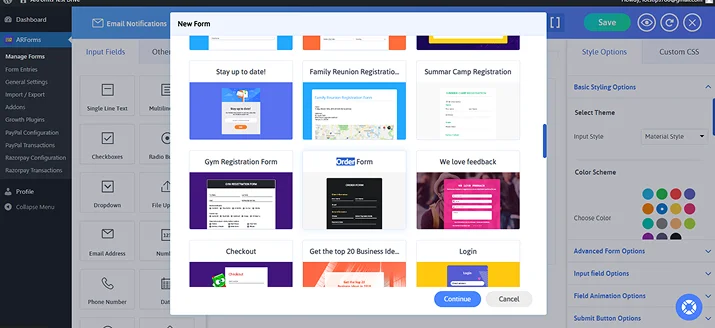
Once you select your preferred template or sample form, click on Continue. You’ll now experience the ARForms’s super simple drag and drop form editor.
From here, you can easily customize your restaurant online order form to match the style of your WordPress restaurant site.
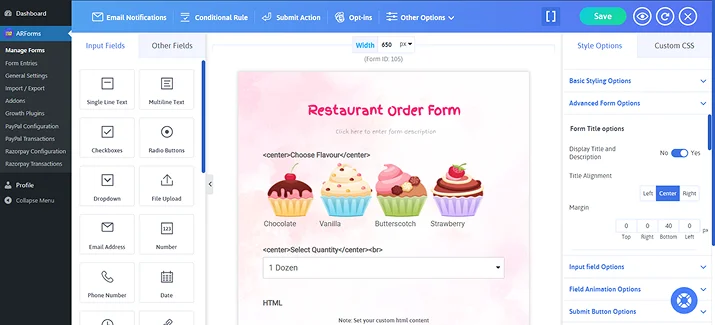
As you can see our sample form finally made it through. Although it doesn’t quite look like it’s “Best” right now, we’ll show you how to customize it and transform it into a simple take out order form.
Step 3: Add Menu Items and Custom Options
Now it’s time to transform this regular order form into a dynamic restaurant online order form.
ARForms lets you customize any form with ease.
The restaurant pre order form template should include the following fields in order to take orders efficiently:
- Customer personal details (name, contact number, address)
- Order details (menu selection, quantities, special instructions, total price)
- Payment (order type, payment gateway, total price)
Remember, if you are using ARForms User Signup Addon, you don’t need to ask for customer personal details as only registered users will be able to place orders.
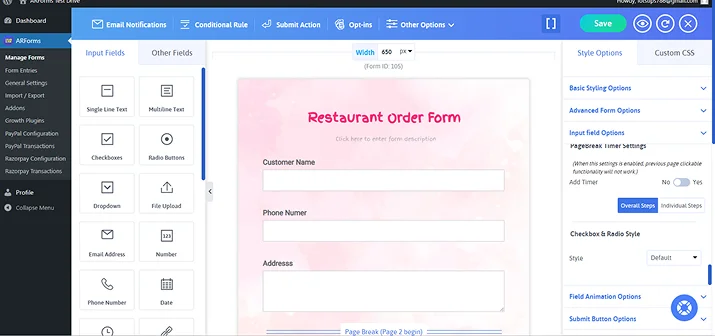
With ARForms simple drag and drop interface, it’s easy to do it. First you have to drag and drop the following fields for collecting customer’s information:
- Single Line text field
- Phone field
- Multiline Text field
Now just label them as Customer Name, Phone Number and Address. Now to make things easier, we’ll make a multi-step online food order form.
Wondering why bother creating a multi-step online food order form when we can make a straight single column form? The answer is simple.
Multi-step online food order form is a deliberate design choice that enhances the user experience and increases conversion rates.
So if you are planning to offer a variety of food items on your menu, this is the best design choice.
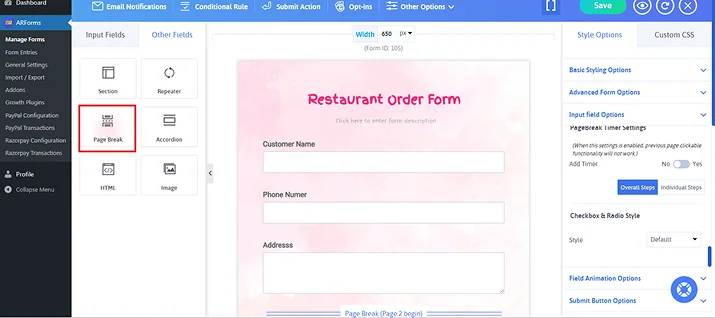
Simply select the Page Break field and drop it down right after customers details.
After the next page, first go ahead and click on the Radio Buttons field. This will add the Radio Button right after page break with 2 options.
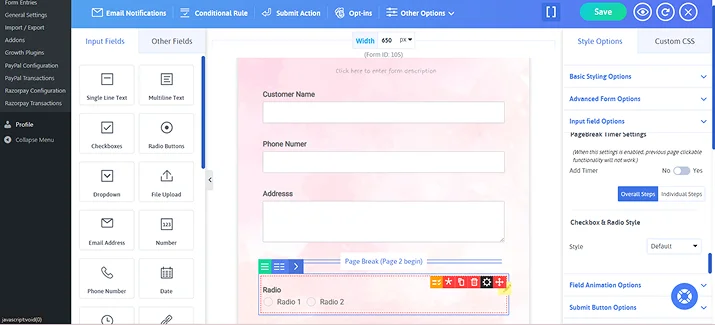
Then you can simply select Field Settings and modify its label name, alignment and all. To turn your Radio Button into menu selection, go to Manage Options in that same field.
Here, you can easily embed images and change options to make a complete food item selection menu based on categories.
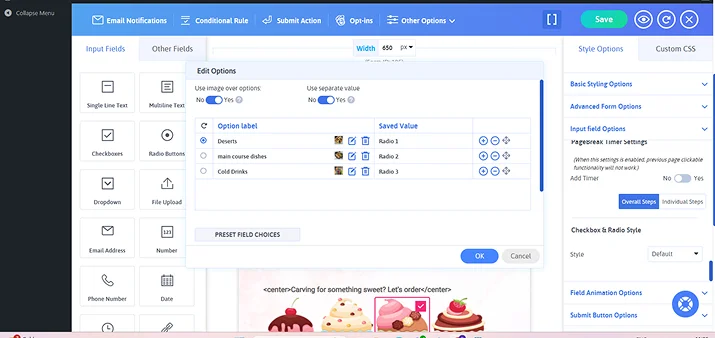
Once you add your food categories, click on “OK” and save.
Now repeat the same process but this time for menu sections. Plus, remember to use check boxes so your customers can easily select more than one time.
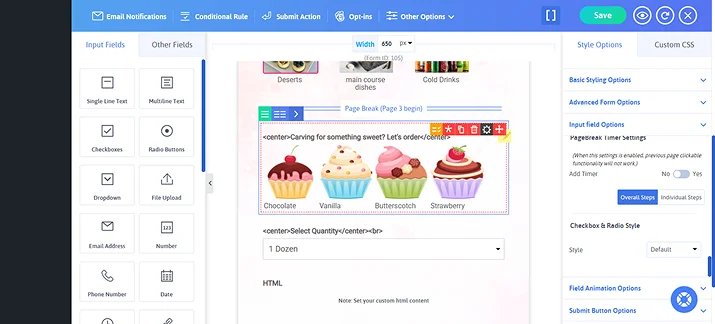
ARForms offers multiple field types to showcase menu items attractively:
- Dropdown Menus – perfect for choosing one dish per category
- Checkbox Lists – useful for multiple selections
- Image Selection Fields – perfect for displaying pictures of dishes so customers can see what they’re ordering
Pro Tip: Add images with each menu item to make your food order form more engaging and mouth watering to make customers decide quickly.
Next, let customers choose how many items they want and show the price per item.
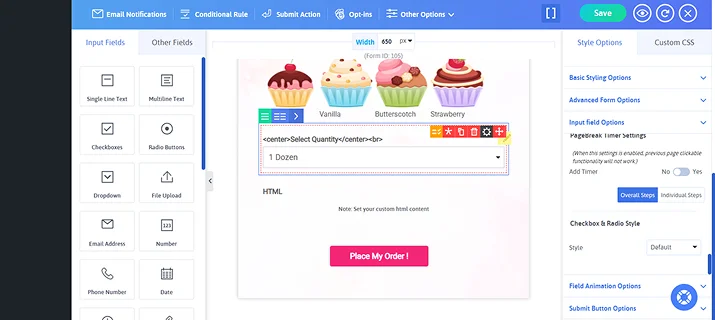
Furthermore, ARForms allows you to add numeric fields for quantity using its advanced Math logic. You can add calculation fields that automatically update the total order cost in real time to avoid any confusion.
Once everything is set, click on “Conditional Rule” and set conditional logic for navigating your customers to specific menu items.
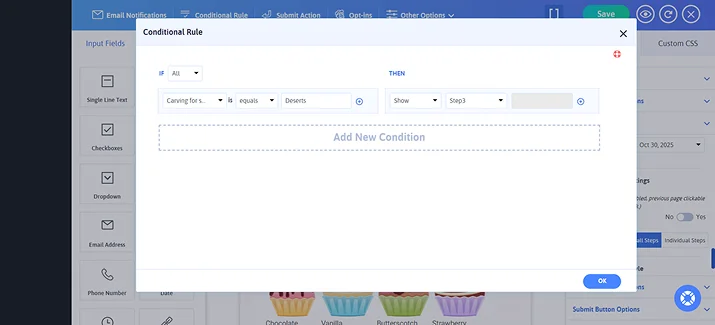
Suppose, they have chosen the “Deserts” categories. Now show them the next page with menu items of deserts only. You can also use it to dynamically show or hide extra options based on what users choose.
Step 4: Customize Form Settings and Confirmation Messages
Once your restaurant order form layout is ready, it’s time to give it a professional touch.
ARForms makes it easier to design your restaurant pre order form the way you want. You can easily customize to match your restaurant website by:
- Adding your restaurant logo
- Changing background image
- Adjust colors and fonts
- Use custom button styles
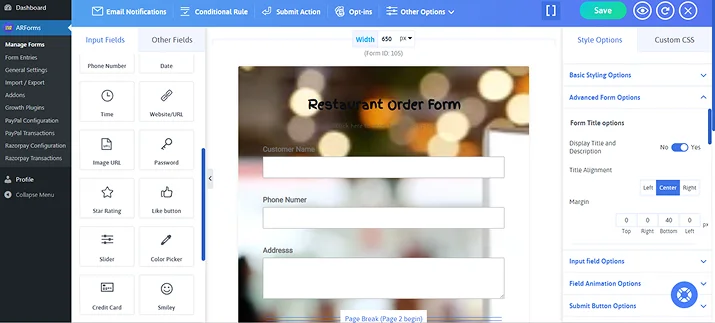
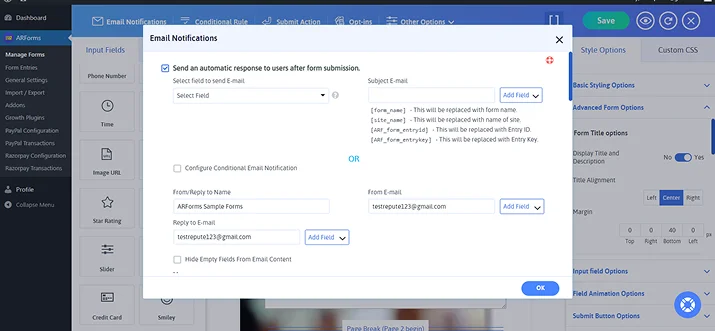
Later on, you can also go to the Email Notifications option on the top bar. Here, you can tick on Send an automatic response to users after form submission. This way, you customers will get a confirmation message, confirming their order is placed successfully.
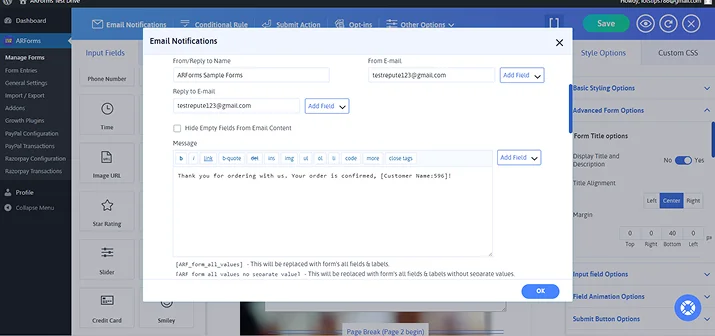
Moreover, you can also customize your email message the way you want to boost your customers’ engagement.
Step 5: Connect a Payment Gateway
Wouldn’t it be great if your restaurant order form handled payments automatically?
For that, firstly you will need to configure the payment settings.
ARForms provides you with the option to configure multiple payment gateways such as PayPal, Stripe, Authorize.Net, PayPal Pro and more.
For that, you will need the addons activation for your favourite payment gateway or if you have ARForms Pro, just go to “Addon” section, search your payment gateways and activate it.

To get it to work your WordPress food order form, let us use the popular payment gateway like PayPal.
Now it’s time to configure your restaurant order form with PayPal.
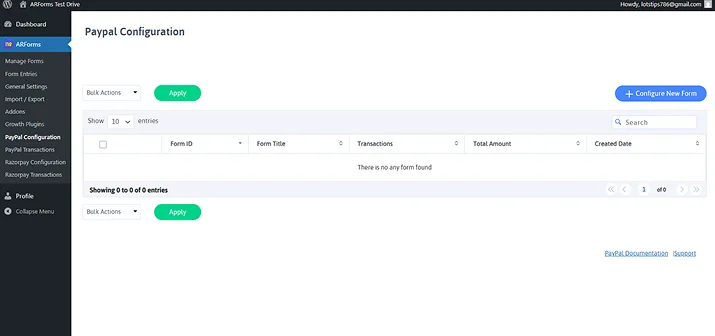
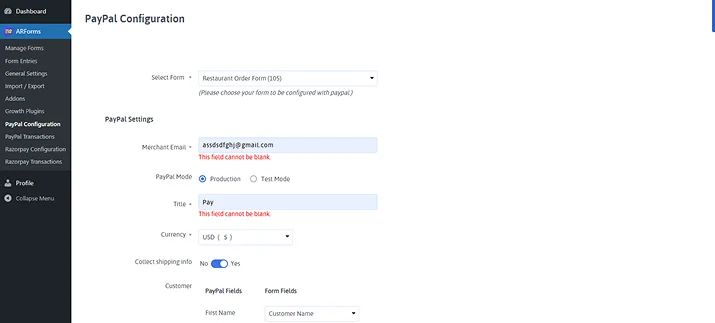
Here, you simply have to click on “Configure New Form”. Once you did, you will have to select the form for which you want the PayPal integration. Moreover, there will be multiple details that you would need to specify.
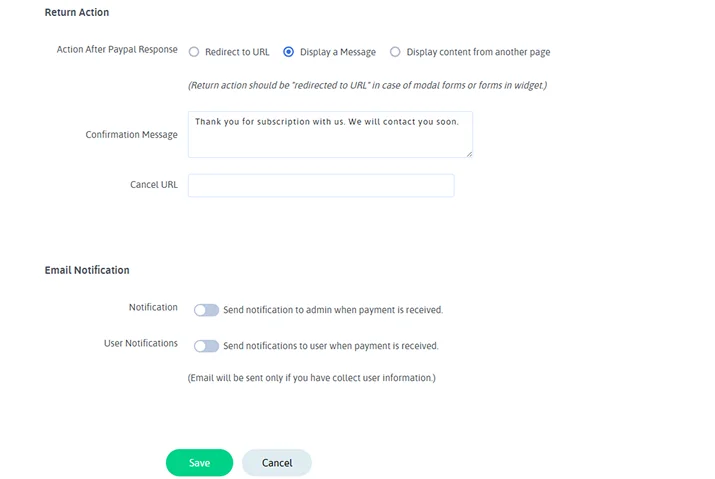
You can also set “Return Action” and “Email Notification” once the payment is processed.
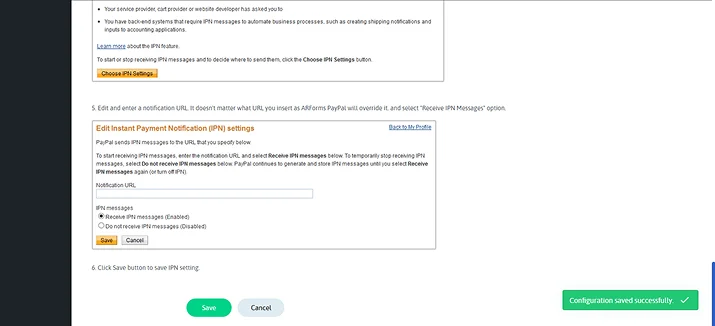
Once all set, Save your all configured settings
Step 6: Embed the Form on Your Restaurant Website
Now all that is left is to copy the shortcode of your restaurant online order form from the “Manage Forms” inside ARForms.
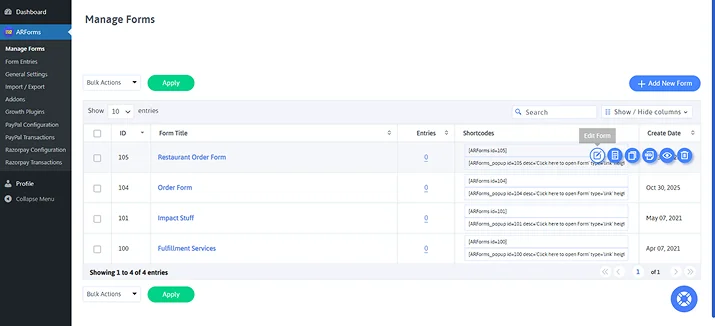
However, if you wanna see how your restaurant order form will work in real life before actually going live. Simple go to edit form. This will show you the ARForms live form editor and on the top, you’ll see an eye icon. Click on it and you’ll get to see a quick live preview of your form working.
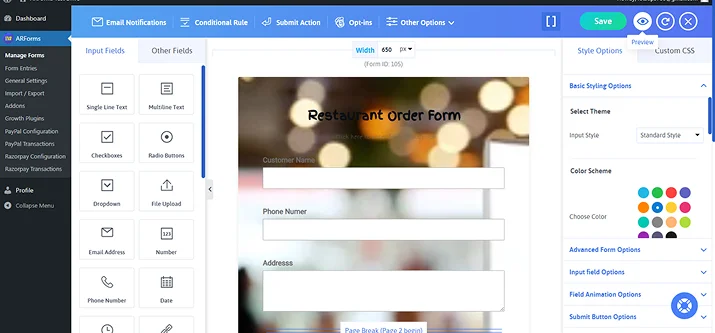
Just with a simple toggle, you can see how your restaurant order form will appear across multiple devices.
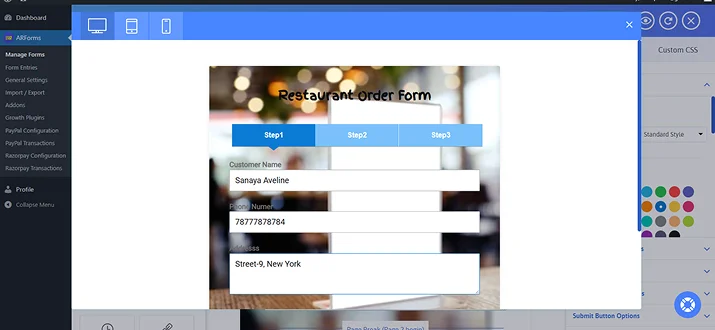
Here, fill in your details and click on next. Now you can see the food category section we have created.
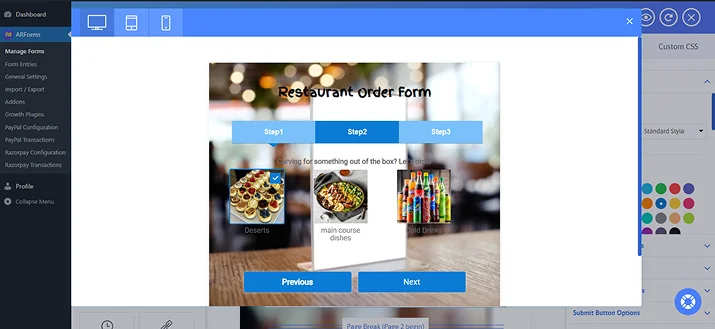
Suppose, any customer selects the “Deserts”. Then they will be redirected to the page of menu items with all deserts you listed.
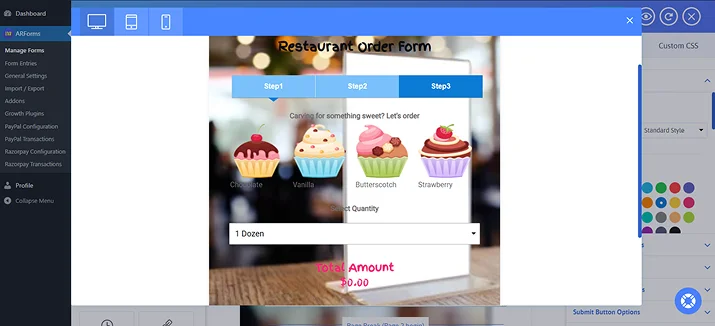
From here, they select the desert they want, its quality and see the total amount live before placing their order.
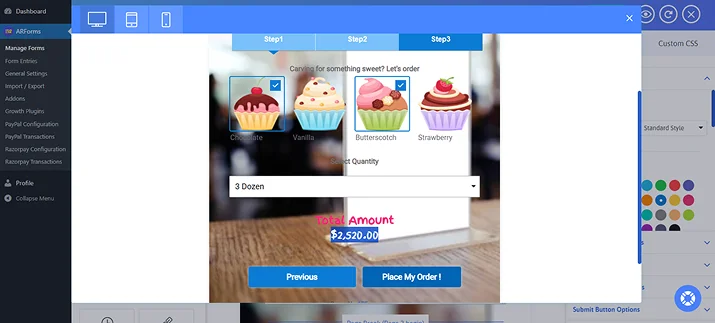
Once all is perfectly responsive as it should be, copy and paste the shortcode of this restaurant order form in your WordPress page or post, wherever you want to display your form.
Time to Start Taking Online Orders Easily With ARForms
A restaurant order form is the simplest way to take food orders online. Your customers can place orders right from your website without any confusion.
With ARForms and a WordPress restaurant website, you can take full control over your restaurant order form. ARForms offers 33+ advanced form fields, 24+ third party integrations and everything you need to make your successful food order form.
So what are you waiting for? Create your restaurant online order form right now using the best WordPress form builder plugin – ARForms.
You May Also Like:
- How To Avoid Common Mistake When You Using Form Plugins
- 8 Reasons You Should Use a Contact Form on Your Site
- Multi-page WordPress Forms: The Best Long Form Recommendation
FAQS
How to create a food order form?
You can easily create a food order form in WordPress using the ARForms plugins. With ARForms, you can design a complete online food order form with zero coding. So it is perfect for takeout, delivery, or dine-in pre-orders
Thus, here’s how to do it:
- Install and activate ARForms
- Choose a restaurant order form template
- Add menu items, images, pricing, and quantity fields
- Enable payment gateways like PayPal or Stripe
- Publish your form on your restaurant website
How do I make my own order form?
To make your own order form, you can use popular form plugins like ARForms. ARForms is the best WordPress form plugins to create order forms with payment gateways and calculation Math logic. You can use its simple drag and drop form builder or pick from its ready to go 50+ sample form to kickstart your order form.
Can I accept online payments directly through my restaurant order form?
Yes, of course! You can accept online payment directly from your restaurant order form using ARForms payment gateways integrations. ARForms allows you to take online payments from secured payment gateways such as PayPal, Stripe, Authorize.net and so many more.