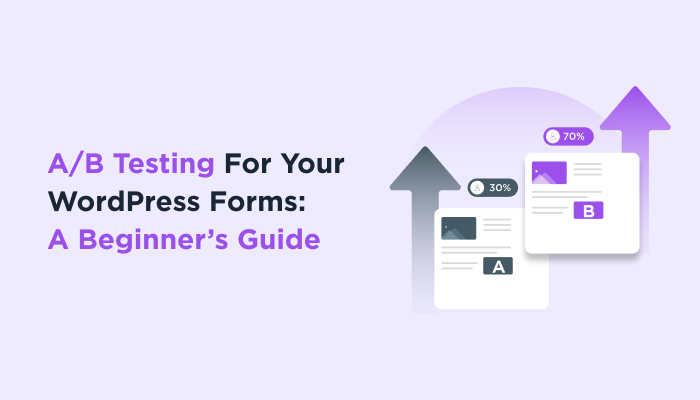
A/B Testing For Your WordPress Forms: A Beginner’s Guide


Ever though which of your WordPress forms has more potential for higher conversions and getting more form submissions? If yes, then A/B testing is what you are looking for.
A/B testing in WordPress forms means creating two versions of the same form and testing which one gets more submissions. For small business owners, this is one of the easiest ways to boost conversion rates and form submission rates without any extra ad spend.
If you run a small business or a startup, you must be always looking for ways to improve your WordPress forms conversion rates, generate more leads and enhance customer experience. And for that, A/B testing WordPress forms is exactly what you need.
Don’t know how to split test your WordPress form? No worries!
In this blog, we’ll guide you on how to A/B test WordPress forms to sky rocket your conversion rates. Ready to explore? Let’s dive right into it.
What Is A/B Testing?

A/B testing is a method which is used for comparing different versions of a WordPress form or WordPress site and see which one appeals more to visitors.
The A/B testing is also called split testing. The reason is it tests the WordPress forms different versions by randomly dividing the audience into two. Later it shows each audience the different versions to analyze which one works the best. A version is for the original version while B is for the variant version.
After collecting data which includes click rates, form submissions and conversion rates, the winner version of the WordPress form is decided.
Why Should You Use A/B Testing for WordPress Forms?
A/B testing WordPress forms are perfect for small businesses because every click and lead counts. Also, A/B testing helps you make more calculated and data driven decisions rather than random guessing work.
WordPress A/B testing forms can help your businesses way more than you think. Here’s how it can help:
- Boosts Conversions: A/B testing helps you boost your conversion rates by getting more users on your sign up or registration forms.
- Improves Customer Experience: By testing different designs, layouts, and visuals, you can keep improving your users’ experience.
- More Analyzed Decisions: Rather than random guessing games, make decisions that show the impact.
- Low Bounce Rates: Helps by pinpointing what leads to abandoned forms and helps reduce bounce rates.
- Maximize ROI: A/B testing WordPress forms means getting more value from existing traffic thus you can easily improve your ROI.
What to A/B Test in a WordPress Form?
For WordPress forms, A/B testing allows you to go ahead of assumptions and make more data driven decisions based on real user’s behaviour.
So here’s are the elements you can A/B test in WordPress forms:
Submit Button
A submit button is your call to action (CTA) element. That’s why this also makes a huge difference in your form submission rates. Your submit button designs, text, color and placement is what exactly drives your visitors to click on it.
You can see it for yourself. Suppose there is a signup form. Now there is one your original current sign up form which has a submit button with text “Submit Now”.
Next you create another variant of it with a different submit button text which says “Sign up Free”.
After A/B testing, you can clearly see that the next variant version of your sign up has more click and form submission rates compared to your original.
Now you compare it yourself and say which one looks more Call to action, “Submit Now” or “Sign Up Free”. You gave your own answer. The same way as button text, every design, color, and placement makes a huge difference.
Form Design and Layout
This one has no doubt that it makes a lot of difference in boosting your conversion rates. A form’s design and layout is the first thing that users see.
You can evaluate two completely different form designs and layouts to figure out which one is more visually appealing and which one has a more friendly user interface. Also, your form’s placement also plays an important role in it. With a/b testing, you can also test your form’s place and see where it appears more eye-catching. The more visible your form is, the more conversions.
However, also make sure your WordPress form is not in the way of the content. Always place it where it catches your visitors attention but doesn’t interrupt the flow.
Number of Form Fields
A/B testing the total number of form fields in your WordPress form is simple. Whether it is a sign up form, membership registration form, or a simple contact form, every field counts. Even adding a few extra fields increases the length of your WordPress form, that’s why always add the fields which are truly required.
One of the best examples of A/B testing WordPress forms number of fields is to check it comply with GDPR complaint. It also suggests asking for details which are actually helpful for generating leads such as name, email, etc.
However, if your form is actually lengthy and you need those extra fields. Then we suggest a multi-step form. This is one of the best pieces of advice for boosting your conversion rates and form submission rates. A multi-step form splits your long form into multiple pages, encouraging users to go step by step instead of showing 10-15 form fields at once.
How to Do A/B Testing for WordPress Forms
Define your goal
Firstly, you must have to define your goal of doing this A/B testing. Is it just to get more conversions? What forms are you planning to run for A/B testing? Are you simply aiming for more clicks? What variant works best for your small business? Is your goal only to improve user experience?
Are you satisfied with a little more form submissions or looking forward to risk for more? Everything has to be pre-planned and considered beforehands.
Pick one element to test
Now it’s time to choose one element for AB testing WordPress forms.
Suppose you have a lead form for generating leads named,” Free newsletter”. Now you send a free newsletter in exchange for emails. This is your first lead and sure you don’t wanna miss it. That’s why we’ll go step by step. You have to focus on a single aspect of your form to get a full version form.
For example, you can start with a submit button, headline or try reducing the number of form fields. A/B testing one element at a time gets you more clear and understandable results.
Ask yourself which except for your form needs the most change or changing which element can make the actual impact?
- If your form fields are too long for, you can use a multi-step form.
- If your contact form’s design is too simple, use some exclusive styling and look at some contact us page examples.
- If you CTA submit button text or placement is not good or visible, look for better CTA text and placement which makes it visible
Duplicate your form in ARForms
Now to be on the safe side, you can duplicate your current WordPress form.
If you have used ARForms to create your forms in the first place, you are in luck.
ARForms is a powerful WordPress form builder plugin that saves your time by duplicating any existing form.
In the “Manage Forms” panel, you’ll see a “Duplicate Form” icon. The second you duplicate your current existing form, you’ll get the same form open in your editor and you can alter any form’s basic or advanced form fields, styling options and everything else with ease.
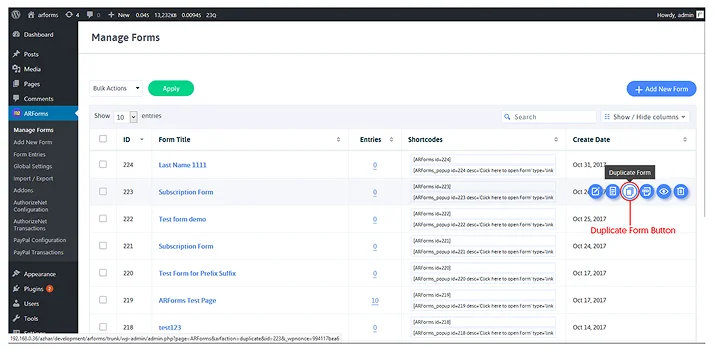
Now this new duplicated form will serve as your test variant.
Set up A/B testing using a plugin
Now set up any popular A/B testing plugin to serve the original and duplicate forms to visitors randomly.
There are many popular A/B testing plugins for testing your WordPress forms such as:
- Nelio A/B Testing
- Split Hero
- VWO WordPress Plugin
- OptiMonk with AI A/B testing tools
- Kameleeon A/B Testing
- AB Tasty
- Meta A/B Testing Tool
Also, using an A/B testing plugin is the right choice because it already comes with multiple integrations. Moreover some even allow you to track conversions with advanced A/B testing tools.
Run the test long enough to gather reliable data

Once you set up your A/B testing plugin and decide everything, launch the A/B test.
Now monitor the performance of each form variation within your A/B testing plugin. Also, make sure to run your A/B testing WordPress forms long enough. If you want accurate data, test your form variants for a long period of time to get accurate data.
The longer you test, the more reliable data you get from real users. An A/B test should run long enough, at least two full business cycles like 1-2 weeks to collect sufficient data from real users.
You have to analyse key metrics such as conversion rate, bounce rate, time on page, form submission rates and everything else.
Choose the winner and apply changes to your live form
Last but not the least, after running your A/B testing WordPress forms, the results will become more clear. After analysing both form variations for such a long time, you can clearly see the conversion rates and form submission rates.
Now choose the form variants which get you more conversions and more form completion rates. Declare it as a winner and make the changes to your live WordPress form.
Once you made all changes live, still we recommend you to repeat A/B testing. A/B testing is actually an on-going process that helps you gain the insights of your online forms. You can continue to use WordPress A/B testing forms for better optimizing your forms for better performance and conversions.
Conclusion: Start A/B Testing WordPress Forms Today
So that’s it for today! We are sure now you have got the whole idea of A/B testing WordPress forms and how important they are for small businesses.
For small businesses, every lead and click makes the difference. So why let it be a guessing game when you can take the decision in your hands. A/B testing isn’t something you have to be scared of. It’s simply all about “Which WordPress form is the best among these 2 options?”.
Now what are you waiting for? Start duplicating your forms with ARForms and run A/B testing to boost your conversion rates !
You May Also Like:
- WordPress Contact Form Plugin Optimized for Better Performance
- 8 Reasons You Should Use a Contact Form on Your Site
- Multi-page WordPress Forms: The Best Long Form Recommendation
FAQs about A/B Testing WordPress Forms
What is A/B testing in WordPress forms?
A/B testing in WordPress forms is a method which is used for comparing different versions of a WordPress form and seeing which one works the best. The main goal of A/B testing in WordPress forms is to improve user experience, increase conversions and form submissions.
How long should an A/B test run?
An A/B test should run at least for 1-2 weeks to collect enough data from real users.
Which form elements should I test first?
Here are the form elements you should test first:-
- Submit Buttons
- Number of total form fields
- Form labels
- Form design and layout
Do I need a plugin for A/B testing in WordPress?
Yes, of course! You need a WordPress plugin for A/B testing WordPress forms. Here are some of the best WordPress A/B testing plugins you can use:
- Nelio A/B Testing
- Split Hero
- VWO WordPress Plugin
- OptiMonk with AI A/B testing tools
- Kameleeon A/B Testing
- AB Tasty
- Meta A/B Testing Tool