BookingPress vs Booknetic: Features, Pricing, and Performance Compared


BookingPress and Booknetic are two popular names in the WordPress appointment booking space. Both advertise extensive feature sets, multiple integrations, and tools designed to make appointment management simple. But how much of that translates into practical value for someone choosing a booking plugin today?
There’s more to this decision than the number of features listed on a pricing page. You also need to think this from a perspective of a service business owner making an investment. Consider:
- How accessible each plugin is
- What its free version actually includes
- How easily you can configure it
- How simply can your clients book an appointment
- What ‘s the price of the complete package
- Whether other users (like you) are satisfied with the product and its support
These are the questions that feature comparison tables alone cannot answer. And that’s what this comparison guide aims to uncover.
We’ll test and compare BookingPress and Booknetic side by side, verify their current pricing and advertised capabilities, test their onboarding and booking experiences, and investigate customer feedback.
BookingPress vs Booknetic: Quick Overview
BookingPress and Booknetic are both well-established WordPress appointment booking plugins that allows your visitors and clients to book online appointments 24/7 directly from your WordPress site. They work best for all service-based businesses such as salon, clinic, spa, fitness studio, house cleaning, rental stores, coaching booking, consultation firms and event planners.
Before we dive in, here’s a quick overview of both plugins:
BookingPress Overview
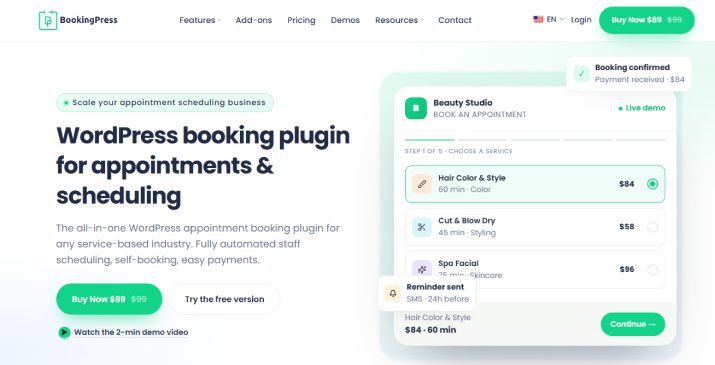
Trusted by 100,000+ service-based businesses, BookingPress is one of the most complete booking plugins for scheduling appointments. It comes packed with 60+ premium addons, 22+ payment gateways, and a surprisingly simplicity that makes it one of the top-rated booking systems for WordPress. Its wide range of payment gateways, generous free version, multiple third-party tools and highly customizable booking form to boost booking complete rate, are key attractions of the plugin.
Booknetic Overview
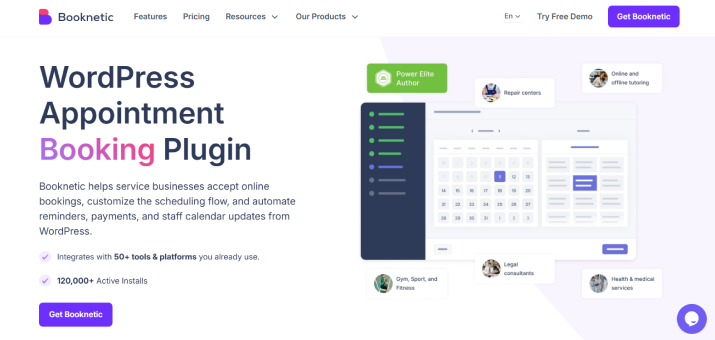
Booknetic is another famous WordPress appointment booking and scheduling plugin for service-based businesses. It claims to have 120,000+ active installs but since it’s not on WordPress.org, we can’t confirm. Integrating with 50+ tools and platforms, this booking plugin lets you accept bookings, manage staff calendars and collect payments via directly from your own website. Native mobile app and workflow automation are its best selling points.
However, how true are these facts? Today we’ll fact-check them all, comparing Booknetic vs BookingPress side-by-side.
How We Compared BookingPress and Booknetic
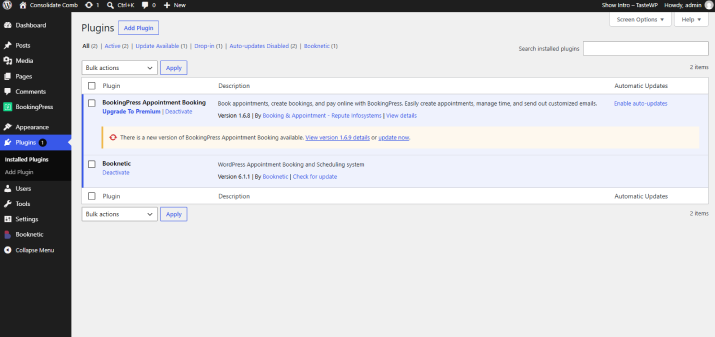
At ARForms, to make this buyers comparison guide honest and fair, our team of experts tested both plugins hands-on, on a WordPress staging site.
We’ve used this WordPress staging environment to test plugin installation, set up wizards, booking form customization, appointment scheduling and the overall experience.
Our testing environment:
- WordPress: Version 6.7+
- PHP: 8.2 / 8.3
- Database: MySQL 8.0
- Server: Nginx with OPcache enabled
We started by installing BookingPress Lite (v1.6.8) and Booknetic Lite (v6.1.1) to see what exactly your businesses (or any business) can accomplish with their free versions. Later, we even moved and compared their premium versions: BookingPress Pro 6.4, released on October 27, 2026, and Booknetic Pro 6.0.1.
Overall, our comparison covers these areas…
- Plugin availability, download, and installation
- Setup wizard and first-time user experience
- Front-end booking forms and customer experience
- Booking form customization and design options
- Booking, scheduling, and business management features
- Free version capabilities and limitations
- Third-party integrations and payment gateways
- Pricing, plans, and upgrade requirements
- Customer support, documentation and user reviews
Testing note: Booknetic and BookingPress were installed on a clean WordPress site on October 30, 2026, and we completed an end-to-end booking test. Therefore, every test was conducted under identical conditions or during the same testing period.
A note on editorial transparency: This comparison is published by ARForms. We acknowledge that both plugins have their strengths and limitations and our tables and analysis highlight both BookingPress and Booknetic plugins equally. Our goal is to give readers the information they need to make their own decision.
Now, let’s compare BookingPress vs. Booknetic, and see which one wins each round.
Plugin Availability, Download and Installation
Plugin Availability, Download and Installation
Before you can use any booking plugin, you first need to get your hands on the plugin files. And, this is exactly where BookingPress and Booknetic take slightly different approaches.
So the difference starts the moment you hit that download button.
BookingPress: Downloading and Installing the Plugin
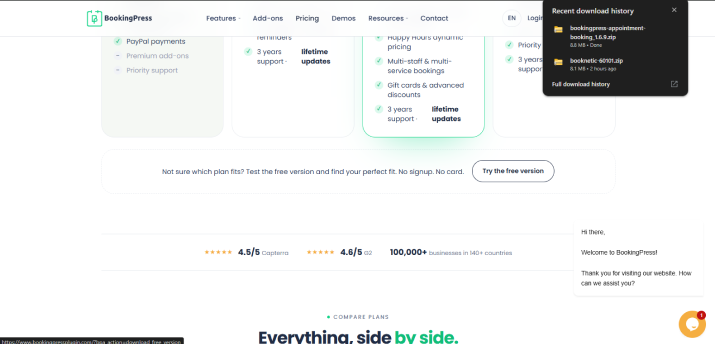
BookingPress offers a free Lite version and a premium version on its official website. You can download the Lite version and install it on your WordPress site easily to start using its core appointment booking features.
For the premium version, you first need to buy a plan and download the Pro ZIP file from your BookingPress account under My Account → My Downloads.
After you have the ZIP file, the installation process is simple
- Log in to your WordPress dashboard.
- Go to Plugins → Add New → Upload Plugin.
- Upload the BookingPress ZIP file.
- Click Install Now, followed by Activate.
The best part? You don’t need to install BookingPress Lite separately when installing the Pro version. BookingPress Pro automatically installs and activates the Lite plugin. Also, you don’t need to give your email just to get the Lite version zip file.
Booknetic: Downloading and Installing the Plugin
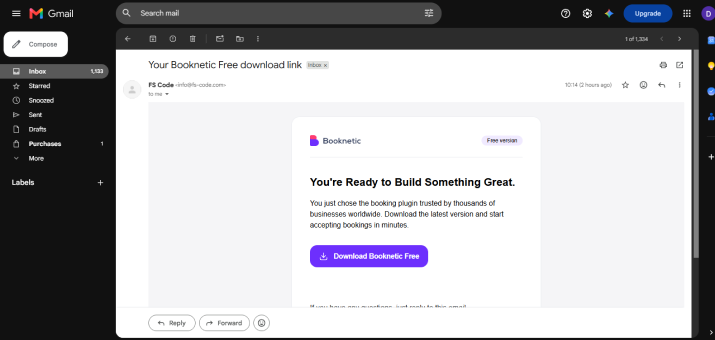
Booknetic distributes its plugin outside the WordPress.org directory. Thus, you must get the lite and premium plugin through CodeCanyon or its official website.
For the official website route, Booknetic sends the plugin download link and license information by email after purchase. You need to download the ZIP file, upload it through your WordPress dashboard, and activate the plugin.
The process looks like this:
- Buy a Booknetic license or obtain its Lite version from the email (Yes, they do ask for your email to give you lite version – unlike BookingPress that lets you directly download)
- From here on, the process of installation is the same as most any booking plugin.
- Upload the zip file, install and activate.
Our experience: Getting the Booknetic Lite ZIP file involved an additional download process including submitting an email address. That is an extra step before you can even begin installing the free plugin.
BookingPress vs Booknetic: Installation Comparison
| Installation Factor | BookingPress | Booknetic |
| Active Installations | 100,000+ | 120,000+ |
| Free version | Yes, Lite | Yes, Lite |
| Official website download | Yes | Yes |
| Premium download | My Account → My Downloads | Purchase/download link through account or email |
| WordPress dashboard installation | Yes | Yes |
| Separate Lite installation required for Pro? | No. Pro can install Lite automatically | Follow the plugin installation and activation process |
| License activation | After installing the Pro version | Through the Booknetic activation screen |
Our verdict: Both plugins require a manual ZIP upload. However, BookingPress makes the Pro installation process more simple by automatically handling the Lite dependency. Plus, Booknetic’s email based download route adds an extra step for users obtaining the plugin directly from its website.
🏅 Winner: BookingPress
Setup Wizard and First-Time User Experience
Installing a booking plugin is the first step only because you also have to now add your business details, create services, configure staff availability, and prepare the booking form before customers can start making appointments.
A good setup wizard can make this process much easier for service business owners who are new to WordPress booking plugins.
Let’s now see how BookingPress and Booknetic handle the first time setup.
BookingPress Setup Wizard
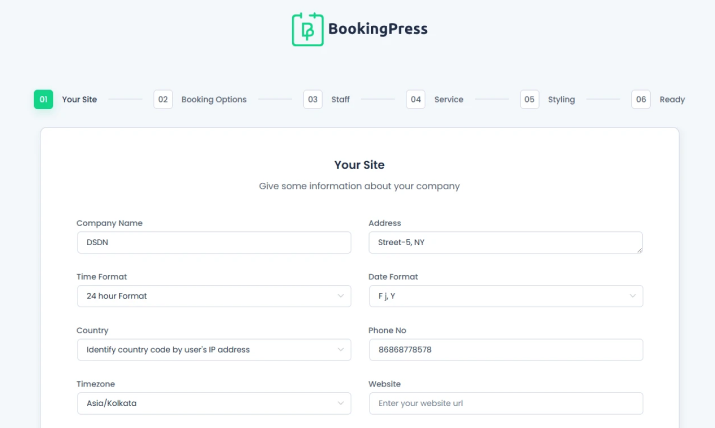
After you activate BookingPress, its setup wizard guides you through all the important steps required to get your booking system ready. The best part? It only took us 10-15 minutes to get things up and start accepting online bookings.
The wizard is divided into a few straightforward sections:
- Your Site
- Service
- Staff Member
- Styling
- Ready – Finish the setup and get your booking page URL, customer panel URL and useful shortcodes.
Booknetic Setup Wizard
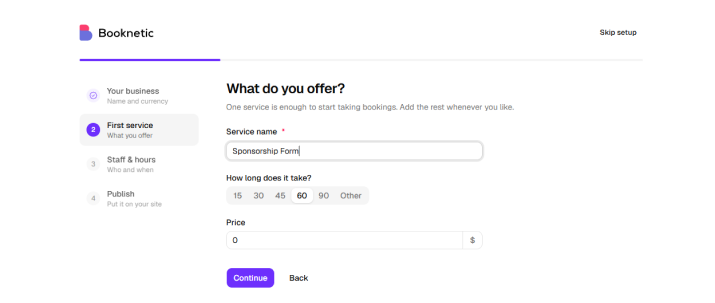
Booknetic also comes with a first-run setup wizard for fresh installations. Introduced in Booknetic 5.10.1, the wizard guides new users through four steps:
- Business Details
- First Service
- Staff & Hours
- Publish
Our verdict: Both Setup wizards made the first setup experience easy. But when compared, the BookingPress setup wizard has a more modern UI and easy to follow steps. Plus, BookingPress Setup Wizard gets you started right away while you still need to configure a few things here and there to get the perfect experience in Booknetic. Yet overall, they both helped so we’re giving both a point here.
🥇Winner: BookingPress and Booknetic
Front-End Booking Form: Which Offers the Better Customer Experience?
Your booking form is where visitors turn into customers.
In other words, it’s the first place where they interact with your appointment booking system, pick a service, select an available time slot and submit their details.
And so, a complicated booking form is not an option. That’s exactly why we looked beyond the admin dashboard and first gave priority to the actual front end booking experience offered by both plugins.
BookingPress Front-End Booking Form
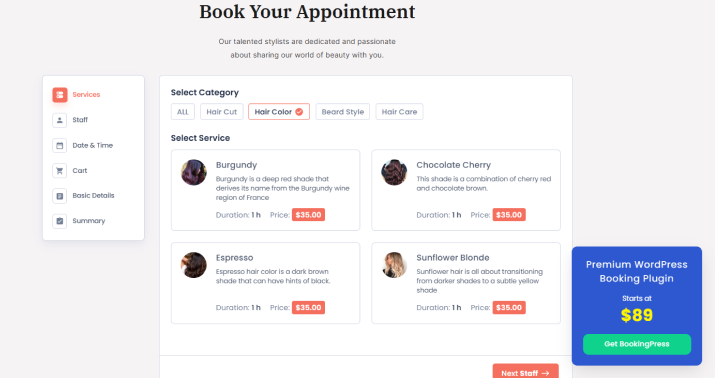
BookingPress uses a step-by-step booking form that guides customers through the appointment process.
Depending on your configuration, customers can:
- Select a service
- Choose a staff member
- Pick an available date and time
- Enter their personal information
- Review their appointment details
- Complete the booking and payment process
You can also change the order of the service, staff, and date-and-time steps. This is useful for businesses where customers prefer choosing a particular professional before selecting a service.
For instance, a salon wants their customers to select their preferred hairstylist first, while a multi-service clinic may want visitors to choose the treatment before selecting a practitioner.
BookingPress gives you control over which details appear during the booking process. You can easily show or hide service prices, durations, staff information, booked time slots and other elements. Plus, if you have location or cart addon enabled, you can also add those steps in the booking form.
The biggest advantage here is flexibility. You can adjust the booking flow to match how your business actually accepts appointments instead of forcing every customer through the same selection order.
Booknetic Front-End Booking Form
Booknetic also uses a step-by-step booking panel. Its standard booking flow can include the following steps:
- Location
- Staff
- Service
- Service Extras
- Date and Time
- Customer Information
- Cart
- Confirmation
The booking panel also supports a customer facing experience that connects the booking process with the services, staff, and availability configured in the dashboard.
Our verdict: Both plugins offer a structured booking experience, but their strengths are different. BookingPress gives you flexibility over the order and visibility of key booking steps. Sure, Booknetic form feels good and polished, yet compared to BookingPress, it feels like it was made in 2019.
🥇Winner: BookingPress
Booking Form Customization And Design Options
Both BookingPress and Booknetic offer booking form customization options. But the level of control and the way you access these options are worth comparing.
BookingPress Booking Form Customization
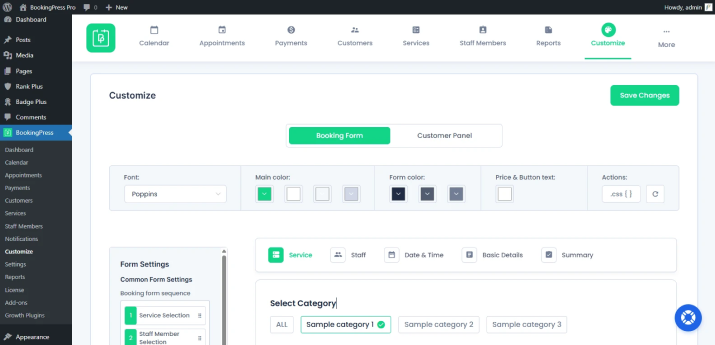
BookingPress includes a dedicated Customize section where you can adjust the appearance and structure of your booking form without writing code.
You can customize several visual elements such as:
- Fonts
- Primary, background, panel, border, title, subtitle and content colors.
- Buttons
- Layout
- Labels
Apart from that, you can also control which information customers see during the booking process. And, another useful option is the ability to change the booking form sequence. You can place the service, staff, and date-and-time steps in an order that makes sense for your customers.Or if the built-in styling options are not enough, BookingPress also provides a custom CSS option for additional design adjustments.
Booknetic Booking Form Customization
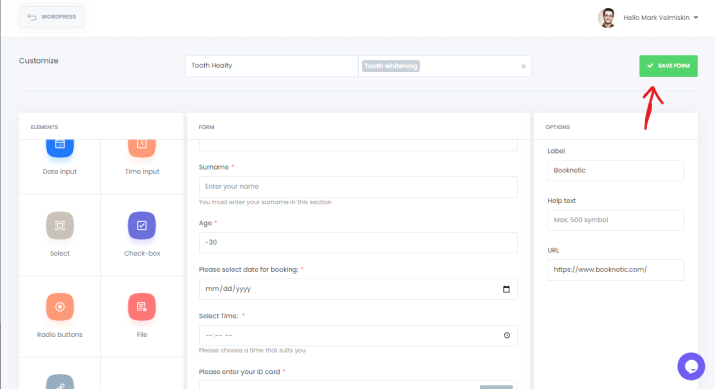
Booknetic provides several options to customize the appearance and functionality of its front-end booking panel.
You can add your company logo and configure business details that appear in the customer-facing booking experience. Plus, you can even customize booking steps, rearrange their order and adjust the information displayed to customers.
Its drag and drop form builder lets you add different field types such as …
- Text input and text area
- Number input
- Date and time fields
- Dropdowns and checkboxes
- Radio buttons
- Email and phone fields
- File upload fields
Its Custom Forms functionality goes beyond basic visual customization and gives businesses more control over the information they collect from customers. But, Custom Forms is an add-on, so you need to check whether it is included in your selected plan.
Our verdict: BookingPress is a great option for businesses that want to customize the booking form’s appearance. Meanwhile Booknetic offers more advanced data-collection possibilities through its Custom Forms add-on.
Winner: Booknetic and BookingPress
Features and Functionality Compared
Both BookingPress and Booknetic offer a wide range of appointment booking features. But when you compare their premium versions side by side, you’ll notice some important differences in booking customization, business management and advanced capabilities.
Thus let’s break down their features into three main categories.
Booking and Scheduling
| Booking and Scheduling | BookingPress Premium | Booknetic Premium |
| Booking form | Fully customizable form with live preview | Multi-step booking wizard |
| Appointments | Unlimited | Unlimited |
| Staff and services | Multiple staff, services, and categories | Multiple staff, services, and categories |
| Admin calendar | Full appointment calendar | Day, week, and month views |
| Recurring appointments | Professional and above | Basic and above |
| Multiple locations | Professional and above | Basic and above |
| Group bookings | Yes | Yes |
| Booking customization | Highly flexible form builder | Structured booking wizard |
Our verdict: Both plugins cover the core scheduling features, but BookingPress gives you more control over the booking form and its appearance.
Winner: BookingPress.
Business Management and Customer Experience
Managing appointments is only one part of running a service business. You also need tools to manage payments, communicate with customers, connect your CRM and automate marketing activities.
Thus here’s how both plugins compare:
| Business Management Feature | BookingPress Premium | Booknetic Premium |
| Deposits | Professional and above | Basic and above |
| Coupons | Yes | Yes |
| Invoices and taxes | Yes | Yes |
| Customer notifications | Email, SMS, WhatsApp, Telegram | Email, SMS, WhatsApp, Telegram |
| CRM connections | Mailchimp, AWeber, Omnisend, FluentCRM | Mailchimp and workflow-based connections |
| Marketing automation | Native Zapier, Make, and n8n support | Webhook-based automation |
| Customer journey control | Automation add-ons | Workflow engine |
Our Verdict: Both plugins cover the core scheduling features, but BookingPress gives you more control thanks to its 60+ premium addons
Winner: BookingPress
Advanced Capabilities
Now, let’s look at the advanced tools that can make a difference as your business grows.
| Advanced Feature | BookingPress Premium | Booknetic Premium |
| Zoom | Included | Included |
| Microsoft Teams | Included | Included |
| Google Meet | Available | Included |
| Zapier | Native integration | Webhook-based |
| Make.com | Native integration | Webhook-based |
| n8n | Native integration | Webhook-based |
| SMS gateways | 36 gateways | Twilio and Amazon SNS |
| Included | Twilio-based | |
| Telegram | Included | Included |
| REST API | Enterprise tier | Every plan |
| White-label | Not available | Elite tier |
| Staff mobile app | Not available | Standard and above |
Our Verdict: It offers more options for automation and customer communication, particularly with 36 SMS gateways and native Zapier, Make, and n8n integrations.
However Booknetic has a clear advantage if you need developer-focused features. Its REST API is available on every plan, and it also offers white-labeling and a staff mobile app.
Winner: Boonetic.
BookingPress Lite vs Booknetic Lite: What Can You Do For Free?
A free version is a great way to test an appointment booking plugin before investing in a premium plan. But yet how much can you actually accomplish without paying?
Let’s compare BookingPress Lite and Booknetic Lite.
| Free Version Features | BookingPress Lite | Booknetic Lite |
| Website limit | Unlimited | 1 website |
| Services | Unlimited | Limited |
| Appointments | Unlimited | Up to 20 per month |
| Staff panel | Not included | 1 staff member |
| PayPal payments | Included | Not included |
| Booking form | Fully customizable | Multi-step form |
As you can see, BookingPress Lite offers more room to run an appointment-based business without upgrading. You can manage unlimited services and appointments across unlimited websites and even accept PayPal payments.
Booknetic Lite, on the other hand, limits you to one website and 20 appointments per month. It also includes one staff member, which gives you a way to test its basic booking workflow.
Winner: BookingPress Lite. It is clearly the more generous free version. Unlimited appointments, unlimited services, unlimited websites, and PayPal support make it a much more practical option for businesses that want to start accepting bookings without purchasing a premium plan.
Integrations: BookingPress vs Booknetic
For appointment booking plugins, integrations can make all the difference. It lets you connect your booking system with payment gateways, calendars, video meeting platforms, CRM tools and marketing automation services.
Now the thing is both plugins offer a good range of integrations but the availability and cost of those integrations are quite different.
| Integration | BookingPress Premium | Booknetic Premium |
| Payment gateways | 22 gateways and POS system | Stripe, PayPal, Square, WooCommerce, Mollie, Razorpay, Mercado Pago, Vipps, 2Checkout, Netopia |
| Calendar sync | Two-way sync Google, Apple, Outlook | Google two-way sync, Outlook |
| Video meetings | Zoom, Google Meet | Zoom, Google Meet, Microsoft Teams |
| Automation | Zapier, Make.com, n8n | Webhooks |
| SMS | 36 SMS gateways | Twilio, Amazon SNS |
| Included | Twilio-based | |
| Telegram | Included | Included |
| CRM and email marketing | Mailchimp, AWeber, Omnisend, FluentCRM | Mailchimp and workflow-based connections |
| Analytics | GA4 conversion tracking | Limited native analytics |
| Security | reCAPTCHA, Cloudflare Turnstile | Available |
The biggest difference is the breadth of BookingPress’s integrations. It supports 22 payment gateways, 36 SMS gateways and native connections with Zapier, Make.com and n8n. On top of that, it even offers integrations with multiple email marketing and CRM platforms.
Booknetic covers around 10 payment gateways and communication requirements, too. It supports popular payment services and offers Google Meet and Microsoft Teams integrations. But its automation options rely on webhooks rather than the same native automation integrations offered by BookingPress.
Winner: BookingPress
Pricing & Plans: Which Plugin Gives You More For Your Money?
Pricing is another very important factor when choosing between BookingPress and Booknetic. Both plugins offer yearly and lifetime plans but to our surprise, their pricing structures and included features are different.
Here’s a quick comparison:
| Pricing Factor | BookingPress | Booknetic |
| Annual plans | $89–249 | $45–299 |
| Lifetime plans | $229–599 | $99–699 |
| Free version | Yes | Yes |
| First plan with Stripe | Standard – $89 | Standard – $99 |
| Recurring appointments | Professional and above | Basic and above |
| Multiple locations | Professional and above | Basic and above |
| Staff mobile app | Not available | Standard and above |
Prices checked and verified from the vendor’s official websites on October 27, 2026.
Booknetic has a lower starting price for both annual and lifetime purchases. But, its plans go up to $299 annually and $699 for a lifetime license.
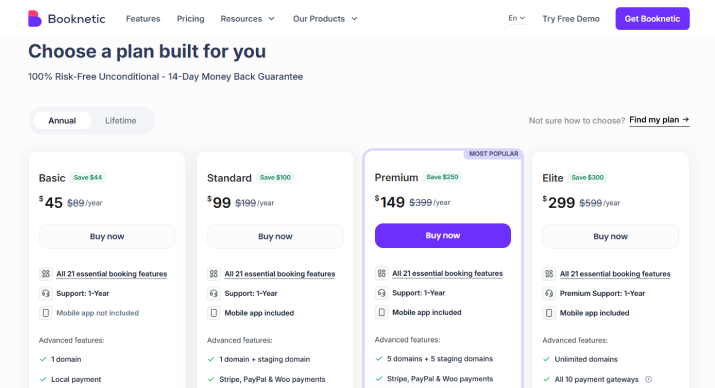
BookingPress starts at $89 per year, with its higher plans going up to $249. Its lifetime plans range from $229 to $599.
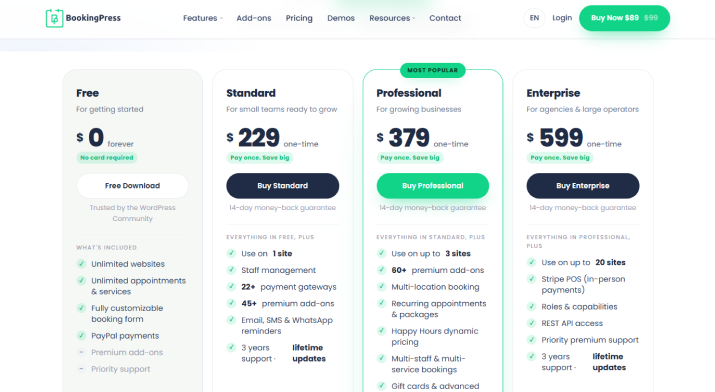
Which offers better value? Booknetic is cheaper if you only need its entry level features. But BookingPress offers a big integration package, more payment gateways and a generous free version. So the better investment depends on the features your business needs and the plan required to access them.
Customer Support and Documentation
Even a feature-rich booking plugin can become frustrating when you run into technical issues. Thus documentation and customer support are also very important things to consider before investing.
| Support Factor | BookingPress Premium | Booknetic Premium |
| Documentation | Feature guides and tutorials | Feature documentation and guides |
| Support inclusion | 1 year support with yearly plans and 3 years on lifetime | 1 year support with yearly plans and 6 month support only on lifetime plans |
| Product channel | Direct vendor website | Direct website and CodeCanyon |
Winner: BookingPress for customer ratings; Booknetic for the clearly stated Basic plan support inclusion
BookingPress vs Booknetic: What Do Customers Say?
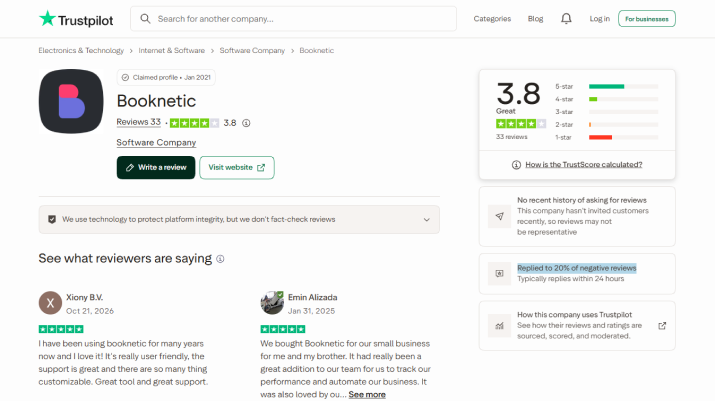
Feature lists and pricing pages can tell you what a plugin promises. Customer reviews give you another perspective on the experience users report after dealing with the company.
For this comparison, we’re looking exclusively at Trustpilot ratings.
| Trustpilot Metric | BookingPress | Booknetic |
| Overall rating | 4.4/5 | 3.8/5 |
| Total reviews | 96 | 33 |
| Five-star review share | 80% | Not specified |
| Response | Replied to 100% of negative reviews | Replied to 20% of negative reviews |
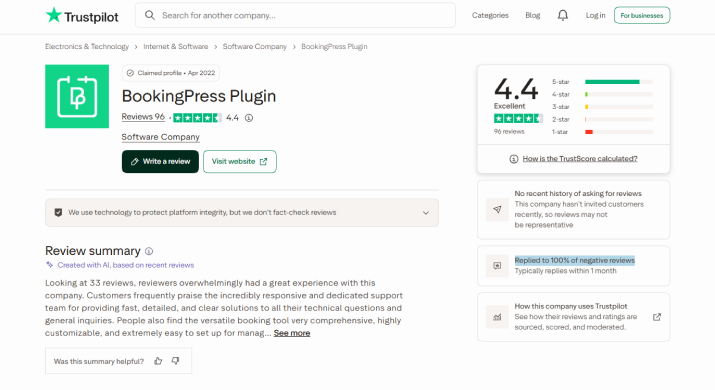
BookingPress has a 4.4/5 Trustpilot rating from 96 reviews compared with Booknetic’s 3.8/5 from 33 reviews. That’s nearly three times as many reviews for BookingPress along with a higher overall rating.
Winner: BookingPress
Note: Trustpilot ratings and review counts can change over time. These figures represent the comparison data checked for this article and reflect customer feedback on Trustpilot on October 30, 2026.
BookingPress vs Booknetic: Final Scorecard
| Comparison Category | Winner | Why? |
| Plugin availability, download, and installation | BookingPress | Direct Lite download and automatic Lite installation with the Pro version make the process simpler. |
| Setup wizard and first-time experience | Tie | Both offer guided setup processes that make getting started easier. |
| Front-end booking form | BookingPress | Offers more flexibility over booking-step order and visibility. |
| Booking form customization | Tie | BookingPress excels in visual customization, while Booknetic offers advanced custom fields and data collection. |
| Booking and scheduling | BookingPress | Provides greater booking-form flexibility and a comprehensive scheduling experience. |
| Business management and customer experience | BookingPress | Offers broader CRM and marketing automation connections through its add-ons. |
| Advanced capabilities | Booknetic / BookingPress | BookingPress offers more communication and automation integrations; Booknetic has an advantage in REST API access, white-labeling, and its staff mobile app. |
| Free version | BookingPress | Offers unlimited websites, services, and appointments, along with PayPal payments. |
| Third-party integrations | BookingPress | Supports more payment gateways, SMS gateways, and native automation integrations. |
| Pricing and value for money | Booknetic | Booknetic has a lower entry price, while BookingPress offers a broader integration package and more generous free version. |
| Customer support and documentation | BookingPress | Offers longer support coverage on lifetime plans, based on the comparison details. |
| Customer reviews | BookingPress | Has a higher Trustpilot rating (4.4/5 vs. 3.8/5) and more reviews (96 vs. 33). |
Final Verdict
In a nutshell, BookingPress and Booknetics both are pretty popular and feature-rich WordPress appointment booking plugins in 2026. However, after testing and comparing them intensively, the results are pretty clear:
BookingPress is the best all-in-one WordPress booking plugin. Compared to Booknetics, it combines everything in one pricing plan, including 60+ premium addons, 22+ payment gateways, modern SaaS-like user interface and flexible booking rules.
So what are you waiting for? Get BookingPress today and turn your simple WordPress site into a complete online booking system.
You may also like