
5 Best WordPress File Upload Plugins for 2026 (Compared)


Are you searching for the best WordPress file upload plugins?
I’ve worked with WordPress forms for years, and file uploads are one of those features that can look simple at first but quickly become tricky when you need to handle different file types and upload limits.
WordPress can handle plenty of things out of the box, but collecting file attachments through forms isn’t one of them. That’s why you need a plugin to add this functionality. With the form right plugin, though, you can easily let visitors upload PDFs, documents, images, and all other sorts of files.
I’ve tested several WordPress file upload options, and I’ll share the ones I recommend in this guide.
Overview of the Best WordPress File Upload Plugins
Short on time? No worries! Here are the best WordPress file upload plugins, so you can accept documents, PDFs, images, spreadsheets and all sorts of content from your visitors.
| Plugin | Best For | Free Version | Starting Price |
| ARForms | Best overall | ✅ | $39 lifetime |
| Iptanus File Upload | Dedicated file uploads | ✅ | $45 one time |
| Forminator | Free forms + uploads | ✅ | $50/year |
| Drag and Drop Multiple File Upload for Contact Form 7 | Contact Form 7 users | ✅ | $24.49/year |
| Gravity Forms | Advanced forms | ❌ | $59/year |
Benefits of Using a WordPress File Upload Plugin
Not all of us are tech-savvy developers who want to write hundreds of lines of code just to add this file upload functionality to our online forms, nor do we want to make people email their files when they can just drag and drop them right onto your website form.
Whether you are collecting homework from students, resumes from job applicants, or photos for a contest, a WordPress file upload plugin makes your life easier, keeps your site secure, and saves you heaps of time.
Here are some big benefits where you can use a WordPress form plugin with file upload option:
- Saves your inbox: No more annoying “File too large to attach” email. Most email providers limit total attachment and message size to between 20 MB and 25 MB per email. So, let your website forms handle the large files easily.
- Automatic Organization: You can set the plugin to automatically sort files into specific folders or cloud storage (like Google Drive or Dropbox).
- Better security: You can control who uploads what. You can easily block dangerous file types (like rogue scripts) and only allow safe files like PDFs or JPGs.
- Professional UX: It actually looks professional for your clients ’cause they just have to drag, drop, and they are done.
But when to use a file upload plugin? Well, since you’re here reading this, I assume you’re already in one of these situations below.
Still, to give you more context of what file upload fields can do, here are some of the most common situations where adding a file upload field makes perfect sense:
- Resume Submissions: Job seekers can easily upload their CVs and cover letters on your careers page.
- Design briefs and assets: Creative agencies can ask clients to upload their brand guidelines, logos, and high resolution images for starting the project.
- Customer Support: You can get more information about your user’s problems and fix them as soon as possible by accepting the screenshots of the issue.
- Assignment Dropboxes: Teachers or online course creators can let students upload homework, essays or project files
- Loan & Rental Applications: Property managers or brokers can collect bank statements, pay stubs and credit reports safely
- Custom Product Printing: eCommerce stores selling custom t-shirts, mugs, or banners can let customers upload their own print-ready designs right at checkout.
See how file upload plugins make it super easy to accept files from visitors on your WordPress site. But as we said before, no one plugin is the same. Thus below are my top recommended (Paid and free) WordPress form plugins with file upload options.
How I Test WordPress File Upload Plugins
Testing a WordPress file upload plugin is all about making sure it works smoothly for regular users while keeping hackers out.
As a WordPress enthusiast, I’ve tested 30+ WordPress form plugins over the years. You’ll be surprised to know there are actually over thousands of form plugins in the WordPress plugin directory, and the reason the total count is so high is due to micro-plugins in here serving a very specific purpose. One of these is file upload.
After weeks of hands-on testing, I’ve handpicked these 5 top plugins that stood out for their
- Features
- Ease of use
- Reliability
- Robust security validation (file type and size limit)
- Smooth drag and drop user interfaces
- Price and support
- Overall experience
Beyond these, here is a simple, step-by-step breakdown of how I tested each file form plugin for WordPress thoroughly.
1. The “Happy Path” (Does it actually work?)
First, check if the plugin does what it says on the box under perfect conditions. I tried uploading a regular .jpg image, .pdf document, or a .docx file.
Plus, I’ve checked the size limit. If the plugin settings say “Max file size: 5MB,” I also tried uploading a tiny 200KB photo and saw what happened.
Lastly I verified where the files actually land in your WordPress Media Library or the specific server folder.
Only the ones that cleared all these checks made further into my guide.
2. The “Stretching” Test (Pushing the limits)
Next, I tried to break it just by using normal files that are a bit “extra.”
- Super big files: If the limit is 5MB, try uploading a 6MB file. You should get a clear, friendly error message, not a broken, crashing page.
- Weird file names: Upload a file named my photo!!! %20 version 1.jpg. The plugin should handle the weird symbols and spaces without losing the file.
- Empty files: I even tested by uploading a completely empty, 0-byte text document.
3. The Security Test (Playing the bad guy)
This is the most critical step. You need to make sure the plugin blocks dangerous files.
So I played the PHP trick. WordPress runs on a language called PHP. If someone uploads a .php file, they can control your website. So I evaluated it by uploading a file named hack.php. The plugins that block this completely only made it into this guide ahead.
4. The User Experience (UX) Test
Finally, look at how it feels to use. If you upload a larger file, do you see a loading wheel or a progress bar? Or are you left staring at a frozen screen wondering if it worked?
These things matter more than you think. Because staring at a loading screen is actually pretty annoying.
Apart from these, I made sure to test the online form on my phone. Can you easily tap the upload button and select a photo from your camera roll? No worries, I only handpicked the mobile friendly form plugins for this guide.
Worth mentioning, in my testing process, I went beyond the 5 winners listed below and tried a total of 31 different WordPress file upload plugins. Sure, there are many popular names you’ll miss out on like Ninja Forms, Happy Forms, Contact Form 7, WPForms, and more, and for good reason. Because our goal is to find the best WordPress form plugin with the robust file uploads, not the simplest form builder plugins.
Although these other form plugins are capable on their own, they didn’t make the cut when I actually tested each of them. I was even surprised when some of the most popular form builder plugins actually didn’t work the way I expected. Afterall, popularity and capabilities are two different factors.
Anyways, with that, let’s explore the 5 top WordPress file upload plugins for media, files and forms.
Expert Review: 5 Best File Upload Plugins For WordPress
1. ARForms

If you’re looking for a WordPress file upload plugin that gives you plenty of control and makes form creation feel like a breeze, ARForms is a great place to start.
It’s an all-in-one form plugin that lets you add file upload fields to your forms and collect everything from documents and images to videos and spreadsheets.
My Experience With ARForms:
I’ve tested quite a few file upload plugins, and ARForms caught my eyes because of how much control you get over the upload experience. Adding a file upload field to a form is simple for real, and you can manage everything from allowed file types and maximum file size to the number of files users can upload.
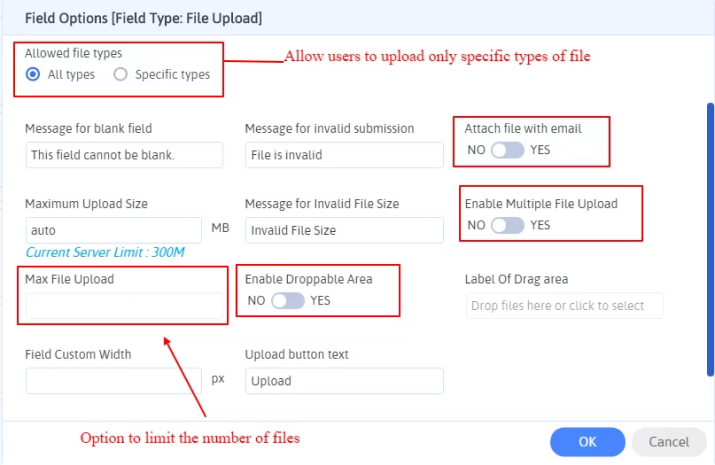
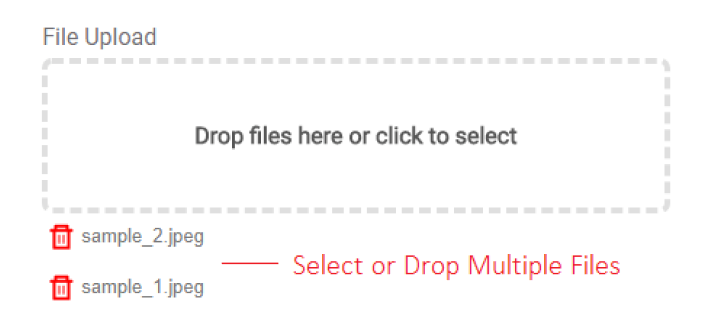
I even liked the multiple file upload option. Visitors can select or drag and drop several files at once which makes things much easier when a form needs more than one document. Besides, ARForms even supports AJAX-based uploads so your visitors can see the upload progress with no reload page.
Another feature I found useful is the built-in crop and rotate option for images. Your visitors can even crop or rotate JPG, JPEG and PNG images before submitting them which can be handy for forms that collect profile photos, product images or other visual content. The uploaded files can also be attached to email notifications and accessed through the Form Entries area.
ARForms supports a wide range of file types, and that includes PDFs, DOCX files, JPGs, PNGs, MP4s, MP3s, and XLSX files. Plus, it also supports less common formats such as HEIC, AVIF, and 3GP so you have full flexibility when deciding what visitors can upload.
Features:
ARForms comes with a lot of useful options for managing file uploads as well as forms:
- Let visitors select or drag and drop multiple files at once.
- Choose which file extensions visitors are allowed to upload.
- Set a maximum file size to avoid unnecessarily large uploads.
- Dynamically show, hide, enable, or disable fields based on user input.
- Send uploaded files to Google Drive, Dropbox, OneDrive, or Amazon S3 using the Cloud Storage add-on .
- 50+ professional-looking templates and sample forms.
- Integration with multiple email marketing tools like Zapier for cloud and payment gateways.
Pros & Cons
| Pros | Cons |
| One-time, budget-friendly pricing | Some advanced features require add-ons |
| Supports multiple file uploads | Smaller community than major competitors yet extensive documentation and excellent customer support |
| 33+ form fields | |
| Built-in popup forms | |
| Drag and drop live editor | |
| Wide range of integrations |
Pricing:
- Free version available
- The pro version costs $39 for lifetime.
2. Iptanus File Upload
If you’re looking for a dedicated WordPress file upload plugin rather than a complete form builder, Iptanus File Upload is worth checking out.
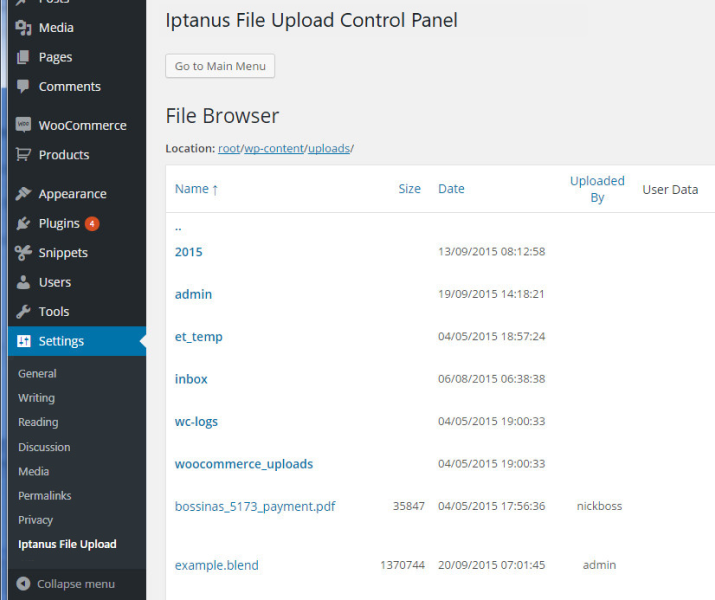
Iptanus lets your visitors upload files from your pages, posts or sidebar. Also, it allows you to add extra fields alongside the upload so you can collect details about who is sending the file and what it is for.
My Experience With Iptanus File Upload
I found Iptanus File Upload quite interesting because it takes a different approach to file uploads. Rather than giving you a big form builder and then adding a file upload field, it puts file uploading at the center of the experience.
The visual editor makes things easier because you don’t have to learn complicated shortcode syntax just to create an upload form. You can add the form to a page, post or sidebar and customize things like file types, upload limits, user roles, and the destination folder.
Another thing I liked was the upload progress bar. Visitors can see that their file is actually uploading instead of wondering whether the form is working. Plus, you can let your visitors upload from mobile devices, and the plugin supports webcam capture which can be useful when you want visitors to submit photos directly from their device.
The free version is surprisingly capable of a dedicated upload plugin. However, features such as multiple file uploads, drag-and-drop uploads, larger uploads and cloud storage are available in the Professional version.
Features
Iptanus File Upload comes with a lot of useful options for handling file submissions, such as:
- Upload files from pages, posts, or sidebar widgets
- Set file type, size, and user-role restrictions
- Let users cancel an upload
- Save files to the WordPress Media Library or FTP/SFTP
- Send email notifications after uploads
- Capture photos or videos using a device camera
- Connect uploads to Google Drive, Dropbox, OneDrive, or Amazon S3 with the Pro version
Pros & Cons
| Pros | Cons |
| Dedicated file upload solution | Advanced features require Pro |
| Visual editor with no shortcode knowledge needed | Multiple file uploads are Pro-only |
| Upload progress bar | Slightly outdated user interface compared to ARForms |
| Supports FTP/SFTP and Media Library | More focused on file uploads than full form building |
| Works with mobile devices and webcam capture |
Pricing
- Free version available
- The premium plan starts at €40 (around $45)as one-time payment.
3. Forminator Forms

Looking for a free WordPress form builder that also handles file uploads? Forminator is a solid option.
It gives you a full form builder along with a dedicated file upload field so you can create everything from simple contact forms to applications, registration forms, and forms that need visitors to submit documents.
My Experience With Forminator
What I liked about Forminator is that file uploads don’t feel like an afterthought. You can add a file upload field directly from the form builder and control the file types, number of files and individual file size limits.
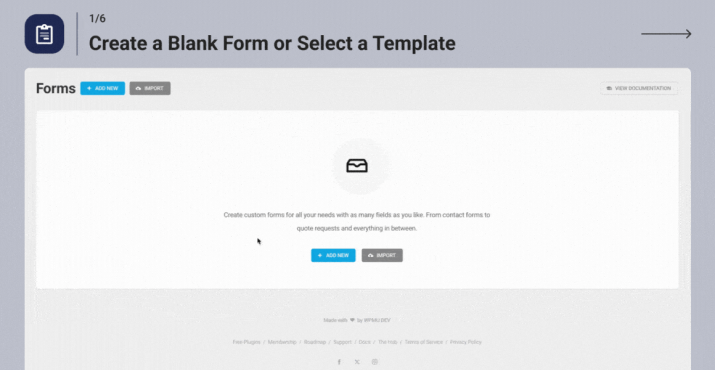
Also, the drag-and-drop upload interface makes things simple for visitors. If your form needs multiple documents, Forminator lets users upload multiple files through a single field instead of creating a separate upload field for every document.
Best of all, Forminator goes beyond file uploads. You get a complete form builder with payment forms, registration forms, polls, quizzes, spam protection and submission management, so it can be useful if you need more than just a simple upload form.
Features
- Single and multiple file uploads
- Individual file size limits
- Maximum number of files
- Submission management
- reCAPTCHA, hCaptcha, and Cloudflare Turnstile
- Payment and registration forms
- GDPR-focused submission handling
Pros & Cons
| Pros | Cons |
| Free version available | Expensive compared to ARForms and Iptanus File Upload plugin |
| Supports multiple file uploads | More features than you may need for simple uploads |
| Drag-and-drop uploader | |
| File type and size controls | |
| Built-in spam protection |
Pricing
- Free version available on WordPress.org
- Forminator Pro starts at $50/year for 1 site.
4. Drag and Drop Multiple File Upload for Contact Form 7
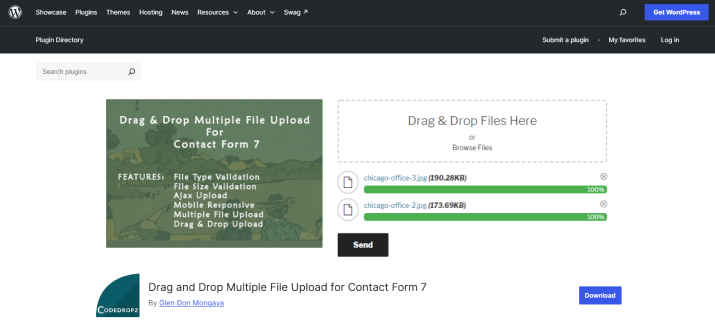
If you already use Contact Form 7 and simply want to add a better file upload experience, Drag and Drop Multiple File Upload for Contact Form 7 is worth the shot, and for good reason.
Although Contact Form 7 has been criticised for its dated user interface for years, there are still many who love this form plugin. So for those WordPress users, I just found the best free wordpress form plugin with file upload option.
As the name suggests, it adds multiple file uploads and drag and drop functionality to Contact Form 7 plugin instead of replacing it with another form builder.
My Experience With Drag and Drop Multiple File Upload for Contact Form 7
I found this plugin useful if you’re already comfortable with Contact Form 7 and don’t want to switch to another form builder just to get better file uploads.
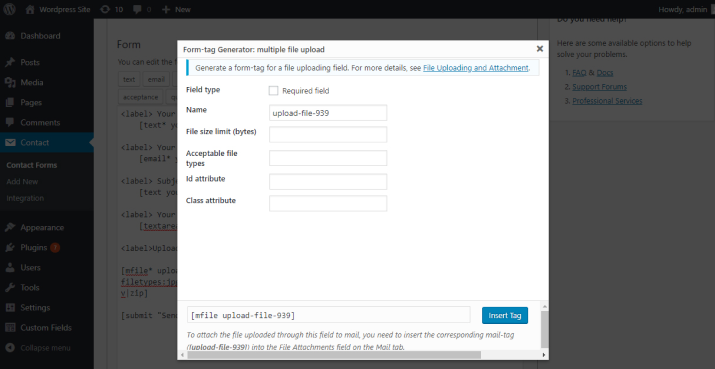
The setup is fairly simple, and you can control things like allowed file types, file size and the maximum number of files. Visitors can either drag files into the upload area or browse their device to select them.
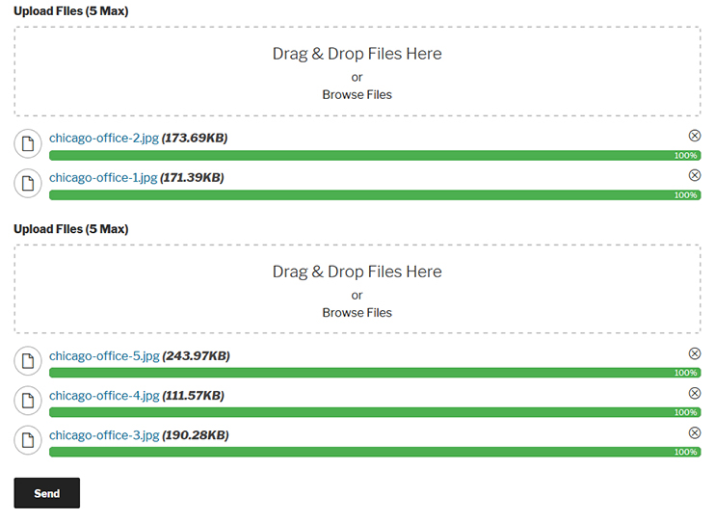
The AJAX uploader and progress bar are also nice touches because users can see their files being uploaded. Moreover, I even liked that it gives your visitors an easy way to remove files before submitting the form. Overall, giving them a chance to fix mistakes without starting over.
Features
- AJAX uploader and progress bar
- File type validation
- Maximum file count limits
- Multiple upload fields in one form
- Remove files before submission
- Temporary file cleanup in the free version
- Cloud storage and larger uploads in Pro
Pros & Cons
| Pros | Cons |
| Works with Contact Form 7 | Requires Contact Form 7 |
| Switch between “Dark” or “Light” themes | Advanced features needs Pro |
| Image Preview; shows thumbnail for images | Free version uses temporary file storage |
| File type and size controls | |
| Compress uploaded files into a ZIP archive |
Pricing:
- Free version available
- The pro version starts at $24.49/year.
5. Gravity Forms
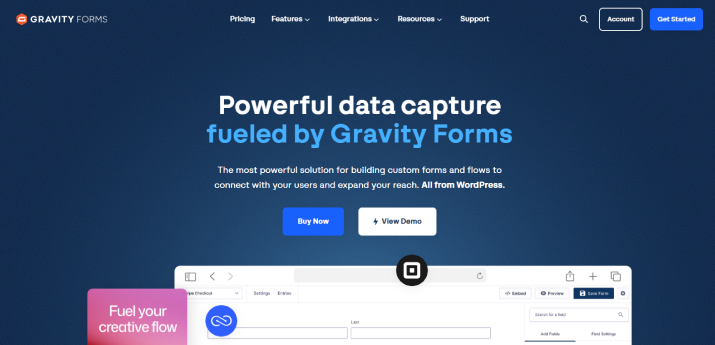
Gravity Forms is another famous WordPress form builder with a reliable file upload feature. Its File Upload field lets you accept documents, images, audio, videos, and multiple files from a single form.
My Experience With Gravity Forms
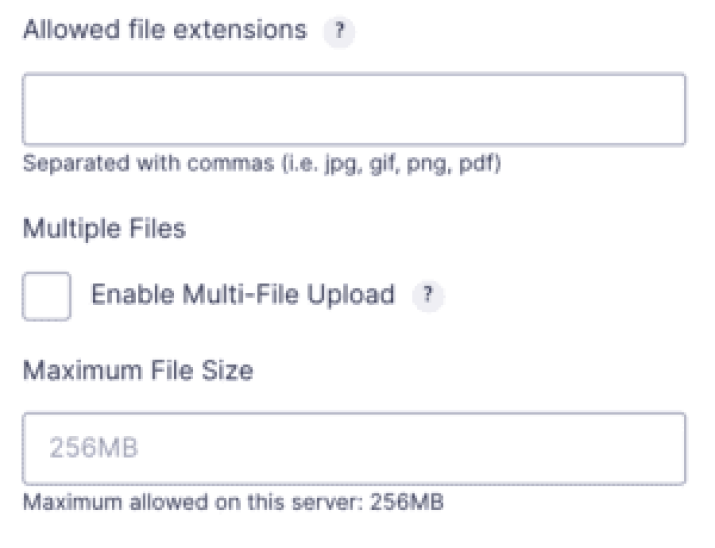
The simplicity of setting up a file upload form was one of the things I loved about Gravity Forms. Adding the File Upload field is smooth and the settings make it even better for deciding which file types visitors can submit and how large those files can be.
Another worth mentioning feature of this WordPress form plugin is conditional logic. You can show or hide a file upload field based on what someone selects elsewhere in your form. For instance, you could ask a job applicant to upload a portfolio only if they select a design related position.
The main thing to keep in mind is that Gravity Forms is a premium plugin with annual licenses. The current Basic license starts at $59 per year, Pro is $159 and Elite is $259 per year.
Features
- Single and multi-file uploads
- Allowed file extension controls
- Maximum file size limits
- Maximum number of uploaded files
- Conditional logic
- Advanced form-building features
- Add-ons for services such as Dropbox and Google Drive
Pros & Cons
| Pros | Cons |
| Reliable file upload field | Annual pricing |
| Supports multiple files | Some integrations require higher plans |
| Flexible file type and size controls | Can be more than you need for simple uploads |
| Conditional logic | |
| Large ecosystem of add-ons |
Pricing
- No free version available
- The premium plan starts at $59/per year.
Final Recommendation: What is The Best File Upload Plugin for WordPress?
To sum up, ARForms is the best overall file upload plugin for WordPress. It combines an easy drag and drop builder with reliable file collection.
If you need an online form that allows users to submit photos, resumes, or PDFs directly from your website, ARForms makes the whole process super smooth. Its simple drag-and-drop form builder lets you add a file upload field to any form in just a few clicks.
Although ARForms is my top pick for WordPress online forms, you can still consider a couple of alternatives based on your project. You can pick Iptanus File Upload plugin if you only want a dedicated WordPress file upload plugin, not a complete form plugin with file upload option.
And if you are someone who loves Contact Form 7, then Drag and Drop Multiple File Upload for Contact Form 7 is worth every single penny due to its smooth integration and top-notch features including AJAX uploader and progress bar.
Now handing over the choice to you. Pick the plugin that best fits your forms, file upload needs and budget.
FAQs
What is the best WordPress file upload plugin?
ARForms is the best WordPress file upload plugin due to its user friendliness, and flexible file upload option settings.
Which plugin allows you to create online forms for uploading images?
There are many plugins that allow you to create online forms for uploading images such as ARForms, Forminator Forms, and Gravity Forms.
Is ARForms a free plugin?
Yes, Of Course! ARForms Lite is a forever free version for ARForms that lets you create all sorts of forms such as contact forms, quizzes, survey form, payment form, login form, signup form, event forms and a lot more with zero coding.
Which is better for me, ARForms, WPForms or Contact Form 7?
ARForms is the most complete form builder plugin for creating all sorts of online forms using the easiest drag and drop builder. WPForms, on the other hand, is promoted as a beginner friendly form builder with built-in templates yet can get pretty expensive due to its recurring cost starting at $99/year. Contact Form 7 is the best free and lightweight form plugin yet with an updated interface.
You may also like