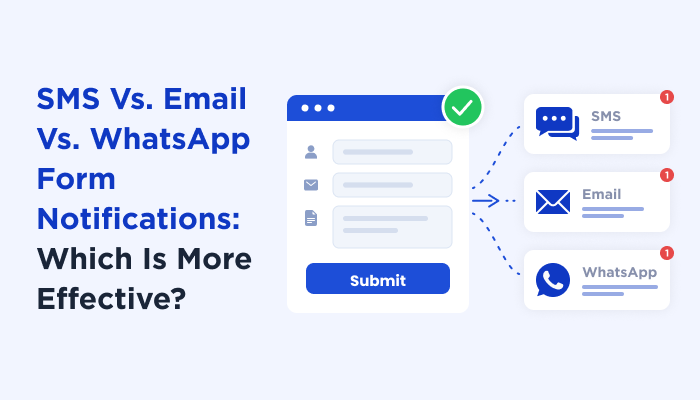
SMS vs. Email vs. WhatsApp Form Notifications: Which is More Effective?


Someone fills out your form, clicks Submit, and the notification lands somewhere. The question is where.
Email sees open rates around 20–30%. SMS is mostly reported at 90–98%, and WhatsApp is in the same range. Put those numbers next to each other and SMS or WhatsApp can look like the obvious choice. But those figures come from marketing campaigns, not form notifications, and a promotional message is doing a very different job from a “new quote request just came in” alert.
A detailed quote request needs to arrive in an inbox with every field and attachment intact. An urgent service request needs to reach someone’s phone within minutes. And a customer inquiry is better handled as a conversation rather than a one-way alert.
That’s where email, SMS, and WhatsApp start doing different jobs. Email wins on detail and cost, SMS wins on speed and reach, and WhatsApp wins on engagement and interaction. The right choice depends on what needs to happen after the form is submitted.
In this post, I’ll unpack the SMS vs Email vs WhatsApp debate and show you how each option handles form notifications.
What Happens After Someone Submits a Form?
A form submission is only the starting point. What matters next is how quickly the notification gets to that right person, how much details it carries, and what that person needs to do with it.
Take three different form submissions.
1. Someone requests a quote for a large project. The sales team needs the complete submission, and it includes the project details, budget, contact information and any files the customer uploaded.
2. Someone else submits an urgent service request. The person handling it may not need every field right away. They need to know that the request came in and have enough details to act quickly.
3. Then there’s a customer who sends an inquiry and expects a response. In these scenarios, simply delivering the notification is not enough. The customer got a question to ask, give more information, or continue the conversation.
The trigger is the same in all three scenarios: someone submitted an online form.
But the job of the notification is different.
That’s why deciding between email vs. SMS vs. WhatsApp isn’t simply about which channel gets read more. It’s about what needs to happen after the notification is received.
Does someone need to read the full submission? Does someone need to act right now? Or does someone need to start a conversation?
Those questions make the differences between email, SMS, and WhatsApp much clearer.
Email, SMS, and WhatsApp Solve Different Notification Problems

Email, SMS, and WhatsApp can all tell you that a form was submitted. But they don’t deliver that information in the same way, and they sure not are equally useful for each type of form notification.
Email notifications give you the details. SMS notifications get the alert noticed. WhatsApp notifications create room for interaction.
Thus here’s how they compare at a glance:
| Metric | Email notification | SMS notification | WhatsApp notification |
| Typical open/read rate | ~20–30% | ~90–98% | ~90–98% |
| Time to read/respond | Hours to days | Minutes | Under 2 minutes |
| Cost structure | Lowest per message / volume-based | Per message | Per conversation / tier-based |
| CTR | ~1–3% | ~5–10% | ~10–15% |
| Message length | Long-form | ~160 characters per segment | Longer messages + rich content |
| Can include the full form entry | Yes | Not practically | Not ideal for full entries |
| File uploads & attachments | Yes | No | Rich media supported |
| Rich media & interactive elements | Yes | Limited | Yes – media, buttons, catalogs |
| Searchable & stored for later | Yes | Limited | Yes, within the conversation |
| Setup required in ARForms | Email notification setup | SMS gateway/provider setup | WhatsApp Business/provider setup |
| Best for | Detailed records, follow-ups, and full submissions | Urgent alerts, confirmations, and immediate attention | Interactive notifications, lead follow-up, and conversations |
At first glance, the numbers seem to make the decision easy. If email gets opened less while SMS and WhatsApp can be read within minutes, why not send every form notification via SMS or WhatsApp?
Because getting a message opened isn’t the same as getting the right job done.
Thus, neither column is the winner. The online forms that work best use all three, tied with different moments, and the rest of this post is about deciding which message goes where.
Why Email Is Still the Best Place for the Full Form Submission

When a form contains everything someone needs to review, email is still the most practical place to send the full form notification, and for most of all forms on most sites.
Email notifications are on by default in ARForms, and because they get the job done for most of the online forms.
Think about a quote request with a dozen fields, a customer message, pricing details and a file attachment. The recipient needs to read it carefully, forward it to a colleague, refer to it later, or keep it as part of the customer record.
Email Gives You the Complete Context
Of course, email form notification wins here by giving the full context.
A form notification shouldn’t always be just an alert that says, “You received a new submission.” Sometimes the recipient needs the complete entry. Guess you never know, but it’s always best to send everything rather than making them ask for more.
Email gives you enough space to add the submitted fields, longer messages, links and attachments without forcing the recipient to piece the information together from multiple messages (Like in WhatsApp)
For instance, a contact form can contain:
- Name and contact information
- Company name
- Service requested
- Project details
- Budget
- Customer message
- Uploaded documents
Putting all of that into an SMS notification isn’t practical. Thus an email can deliver the complete submission in one place.
Email Is Easier to Use as a Record
Form notifications become more than just messages that need to be read once.
A sales team may need to find an old quote request. A support team may need to check what a customer originally submitted. A business owner may need to forward a lead to another team member. The scenarios are endless so it’s always better to have a record that’s easy to search.
Email fits these workflows naturally because messages can be searched, archived, forwarded, and organized into threads.
Email Also Keeps the Notification Cost-Effective
For businesses receiving a large number of form submissions, sending every full submission through a paid SMS or messaging channel can become unnecessary.
Email is generally the lower cost option for delivering large amounts of information. You can send the complete form entry without worrying about message segments or paying separately for every short notification.
That doesn’t mean email is always the fastest option, but it sure means email is the better place for the information itself.
When Should You Use Email Form Notifications?
Email is a natural fit when:
- The recipient needs the complete form entry.
- The notification contains multiple fields.
- Customers can upload files or documents.
- The information needs to be searched or referenced later.
- The recipient needs to forward the submission
- The notification is part of a sales, support, or record-keeping workflow
So if the question is, “Where should the full form submission live?”, email makes a lot of sense.
But what happens when the full submission isn’t the priority? What if someone needs to know about the submission right now? That’s why let’s break down SMS notifications next.
Why SMS Wins When the Notification Can’t Wait

Email is useful when the recipient needs the details. SMS becomes more useful when the recipient needs to notice the notification quickly.
Suppose a customer submits an urgent service request at 10:30 PM.
The person responsible for handling it doesn’t necessarily need to read every field immediately. They just first need to know that an urgent request has arrived. And as for the person who submitted that form, they just want to feel heard right away.
That’s the kind of situation where SMS can be more useful than email.
SMS Puts Urgency First
SMS notifications are short by design so you can send the information that matters most.
For you, this can be like:
“New urgent service request from John. Please check the submission and respond as soon as possible”
For your customer or the person who submitted the form, this can be like:
“Thanks, your request is submitted.”
The full submission can still remain in the form entries or email. The SMS simply acts as the trigger to get someone’s attention.
That’s an important distinction. SMS doesn’t have to replace your email notification. It can work alongside it.
SMS Works Well for Time-Sensitive Form Events
Some form submissions are more urgent than others. For example:
- A new lead that needs a quick callback
- An urgent support request
- A booking cancellation
- A last-minute appointment change
- A delivery or service request
- A high-value inquiry
- An internal alert that needs immediate attention
In these situations, waiting for someone to check their inbox….is simply not the smartest thing you can do.
An SMS notification can tell them something needs attention now.
SMS is Not Designed for the Full Form Entry
The same limitation that makes SMS less fitted for detailed submissions is also what makes it effective for alerts.
You have limited space. Thus, the message needs to focus on very important information only.
Instead of a boring long message with all form details:
Name, email, phone number, company, address, service, budget, message, uploaded file…
You can send and SMS that looks like this:
“Your request is accepted. Budget: $5,000+. Check your email for the full submission.”
The SMS gets the recipient’s attention. Email provides the details. This is where the two channels can complement each other rather than compete.
When Should You Use SMS Form Notifications?
SMS is a best fit when:
- The notification is urgent.
- The recipient needs to react within minutes.
- The message can be kept short.
- The full submission is available somewhere else.
- You need an immediate alert for leads, support, bookings, or service requests.
So while email is better suited to the complete record, SMS is best-fit to the immediate alert.
But there is a third situation.
Sometimes the recipient doesn’t just need to read the notification. They need to respond and continue the conversation.
That’s where WhatsApp takes a different approach.
How WhatsApp Is Different From Both Email and SMS Notifications

WhatsApp sits somewhere between a notification channel and a conversation channel.
Like SMS, it can put a message in front of someone quickly. But unlike a traditional SMS alert, it supports a richer and more interactive conversation.
WhatsApp Turns a Notification Into a Conversation
Consider a customer who submits a form asking for information about a service.
An email can notify the business. An SMS can alert the business. But with WhatsApp, the form notification can naturally lead into a conversation, whenever the customer wants.
The business can respond, ask for more details, share more details, send media or continue the discussion in the same messaging environment.
That changes the role of the notification.
Now, it isn’t simply,“A form was submitted.” It becomes:
“A customer started a conversation.”
WhatsApp Works Well For Lead Follow-Up
This can be useful for forms designed to generate leads. For example, someone submits:
“I’m interested in your wedding photography package. Can you send me the pricing?”
An email notification gives the sales team the full inquiry. An SMS can alert them that a new lead has arrived. But a WhatsApp form notification? It can move that lead toward an actual conversation.
WhatsApp Also Supports Richer Messages
Another difference is the type of content you can use.
Based on the WhatsApp setup and provider, notifications can add richer elements such as:
- Images and other media
- Buttons
- Links
- Product or service information
- Conversational replies
That gives WhatsApp more flexibility than a basic SMS notification. But that doesn’t make it a replacement for email.
If the form contains a long application, multiple fields, or several uploaded documents, email is still a more natural home for the complete submission.
When Should You Use WhatsApp Form Notifications?
WhatsApp makes the most sense when:
- The notification is likely to lead to a conversation.
- You need quick customer responses.
- Your audience actively uses WhatsApp.
- You want to send rich or interactive content.
- The form is part of a lead-generation or customer-support workflow.
- The recipient may need to ask questions or provide more information.
So the three channels have different plus points:
Email handles the details. SMS handles the urgency. WhatsApp handles the conversation.
And that leads to a more useful way of thinking about form notifications: you don’t have to decide one channel for everything.
The Real Difference: What Do You Want the Recipient to Do?

By now, the differences between email, SMS, and WhatsApp should be clear. But there’s a simpler way to decide which one belongs in your form notification workflow:
Start with the action you want the recipient to take. The channel should support that action.
- If the recipient needs to review the complete submission, email is the natural fit.
- If they need to notice something immediately, SMS makes more sense.
- If they need to respond and continue talking to the customer, WhatsApp can be the better fit.
| Your goal | Best fit |
| Read the complete submission | |
| Keep a record | |
| Send attachments | |
| Keep costs low | |
| Get someone’s attention immediately | SMS |
| Alert a sales rep | SMS |
| Alert an on-call employee | SMS |
| Send a short urgent message | SMS |
| Get a customer to respond | |
| Continue a conversation | |
| Send interactive/rich content |
This also explains why open rates alone aren’t enough to pick a notification channel. Because a channel can have a high read rate and still be the wrong choice if it doesn’t give the recipient what they need to act.
What Should a Form Notification Look Like on Each Channel?
The same form submission can produce very different notifications depending on the channel.
Let’s say a visitor submits a quote request with their name, email address, phone number, service they’re interested in, budget, and project details.
Thus here’s how that same submission might work across the three channels.
Email: Send the complete submission
Subject: New Quote Request from Sarah
New quote request received
Name: Sarah Johnson
Email: [email protected]
Phone: +1 555 123 4567
Service: Website Design
Budget: 5,000–10,000
Project details:
We need a new website for our business and would like to discuss the project timeline and requirements.
Submitted: October 2, 2026.
The recipient has everything they need in one place. So, they can easily review the request, forward it to someone else, reply to the customer or return to the message later.
SMS: Send the essential alert
New quote request from Sarah Johnson. Budget: 5,000–10,000. Check your email for the full submission.
The SMS doesn’t try to reproduce the entire form. Because its job is simply to make sure the recipient knows something important has happened.
WhatsApp: Start the conversation
” Hi Sarah! Thanks for requesting a website quote.
We got your request for a $5,000 website project with a 30 day timeline. No worries, our team will review the details and get back to you within 24 hours”.
Overall, the key difference isn’t just the format. It’s the job of the message.
- Email: Here is everything you need to know.
- SMS: Something important just happened.
- WhatsApp: Let’s continue the conversation.
That distinction makes it much easier to design notifications that actually help the person receiving them.
You Don’t Have to Choose Just One

The biggest mistake is treating email, SMS, and WhatsApp as competing options where you must pick one winner.
They can work together.
A form submission can trigger different notifications based on what needs to happen next.
For instance, someone submits an urgent service request. Then,
- Email can contain the complete request and any uploaded files.
- SMS can alert the responsible person immediately.
- WhatsApp can be used when the customer needs a quick follow-up conversation.
Now each channel has a clear purpose instead of sending the same message three times.
This is where a hybrid notification strategy becomes useful.
Email + SMS
Use email for the complete form entry and SMS for the immediate alert.
Email + WhatsApp
Use email for the record and WhatsApp for customer communication.
SMS + WhatsApp
This combination can make sense when immediate visibility and conversational follow-up are both important.
The important part is that each notification should have a reason to exist.
Which brings us to an important question: if all three channels are available, should you actually use all three? Not always!
When Sending All Three Notifications Is a Bad Idea

More notifications don’t automatically mean better communication.
If the same form submission triggers the same email, SMS and WhatsApp message every time, the recipient may simply get the same information three times.
That creates noise instead of improving the workflow.
Imagine receiving this:
- Email: New contact form submission
- SMS: New contact form submission
- WhatsApp: New contact form submission
Nothing has been added. The recipient has simply been notified three times.
Thus the better approach is to give each channel a specific job.
Don’t Send SMS When the Notification isn’t Urgent
If a customer submits a general contact form and there’s no need for an immediate response, an email notification is more than enough. There is little reason to interrupt someone’s phone with an SMS just to tell them something they can review later.
Don’t Use WhatsApp Just because it Has High Engagement
WhatsApp works best when there is a genuine reason for interaction. If the notification is simply an internal record that needs to be stored and reviewed later, email can already handle the job perfectly well.
Don’t Duplicate the Entire Form Entry Everywhere
A 15-field form with attachments doesn’t need to become a big WhatsApp message and multiple SMS segments.
Keep the full information in email and use shorter notifications to point the recipient toward the information when immediate attention is needed.
Don’t Notify People Who Don’t Need to Act
A notification should reach the person responsible for the next step.
If a form submission doesn’t need immediate action from the full team, sending it to everyone through every channel can quickly become distracting.
The goal is to send the right notification through the right channel at the right time.
That’s exactly why the most effective form notification setup isn’t necessarily email-only, SMS-only, or WhatsApp-only, but the one that matches the notification channel to the action that needs to happen next.
How to Send SMS and WhatsApp Notifications From a WordPress Form
Setup only takes just a few minutes after your ARForms form builder plugin is installed and configured.
Now as for setting up SMS and WhatsApp form notifications, here’s how it goes:
The easiest, “all-in-one” way to do this without messing with two separate add-ons or complex coding is to use Twilio. Twilio handles both SMS and WhatsApp inside a single account.
1. Activate SMS and WhatsApp notification addons: From your WordPress dashboard, go to ARForms » Addons and activate SMS and WhatsApp addons. This needs a Pro license.
2. Prep Your Twilio Account: Sign up for a free account at Twilio, and from your main dashboard, copy your Account SID and Auth Token. Get your Twilio Phone Number (for SMS) and activate the Twilio Sandbox for WhatsApp (to send WhatsApp messages).
3. Build Your Form in ARForms: Creating online forms needs no touch of coding. Just simply drag the form fields and drop them to your online form. That’s all! And if you don’t want to work this little either, then don’t! ARForms comes with 50+ professional-looking templates and sample forms. Pick whatever you like, name it, and you are set to go.
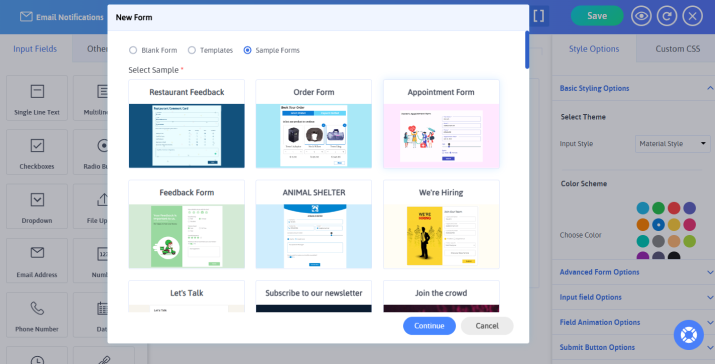
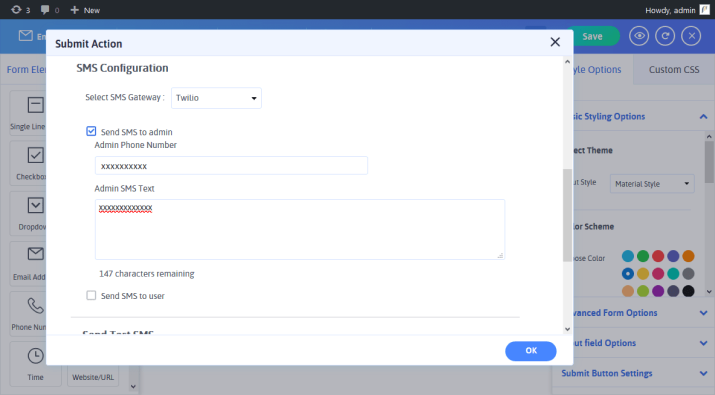
4. Link Your Form to Both Channels: Triggering both SMS and WhatsApp notifications from this addon needs you to open the form you want to link, and click on the “Submit Action” tab from the top form editor toolbar.
5. Configure SMS Notifications: Select Twilio as your SMS gateway, decide whether to send an alert admin or user, or both, and enter the SMS text for both. If setting for the user, map the phone number field and set the country code. You can also send a test SMS to see how it will look.
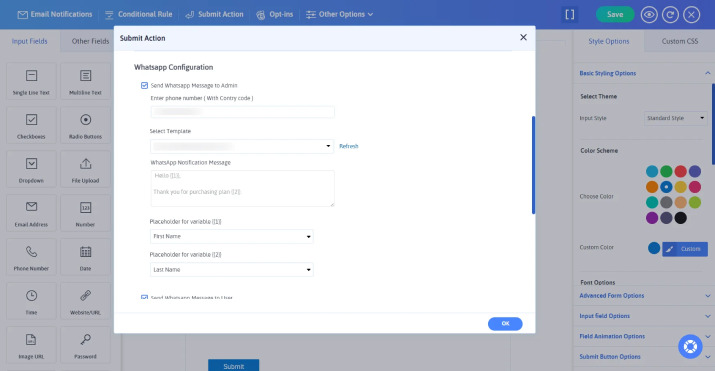
6. Configure WhatsApp Notifications: Just below, you also see the WhatsApp Configuration section where you can set the automatic notifications for admin and user. If setting for the user, select the phone number field and the pre-approved message template from the dropdown.
7. Add conditional logic if you need: Set on the “Configure conditional submission” to fire this notification only when specific answers come in, such as an urgency dropdown set to “Urgent”.
8. Save and make the form live: That’s it! Now your form is ready to go live and send automated form notifications via WhatsApp and SMS.
Final Answer
To sum up, the best notification system doesn’t pick one winner. It assigns each channel the job it’s best equipped to handle. Here’s what we have concluded for form notifications:
- Email wins on detail and cost.
- SMS wins on speed and reach.
- WhatsApp wins on engagement and interaction.
All in all, use email notification when the submission needs to be read, SMS notification when it needs to be noticed and WhatsApp notification when it needs a response.
Never make important submissions go unnoticed with ARForms. Send the right notification via Email, SMS, or WhatsApp with ease.
You may also like