How to Add Custom CSS to WordPress Forms (4 Easy Methods)


Even a simple WordPress form holds the power to affect your user’s whole experience and conversion rates! Till now, we are sure all of you would be aware of that. A regular WordPress form sometimes appears boring and out of place inside your WordPress site, but customizing it can help it seamlessly match your website’s design.
There’s always room for customization and personalization in every WordPress form. And sometimes, no-code styling options may have limitations, so exploring additional customization can bring your form’s design to the next level.
That’s where custom CSS forms comes into play. Adding custom CSS to your WordPress forms gives you multiple options to personalize your form’s colors, layout and designs to match your site perfectly.
Are you ready to understand more about WordPress custom CSS? In this guide, we’ll explore ways to add Custom CSS to WordPress forms in the easiest way possible. Let’s jump right into it.
What is Custom CSS in WordPress?
Before jumping straight to adding custom CSS, let’s understand what custom CSS is actually.
Custom CSS in WordPress allows you to add or modify the existing CSS code and rules. CSS stands for Cascading Style Sheets, allowing you to control and change the visual appearance of your WordPress forms.
While most users are more comfortable with pre-built templates, themes and sample forms, adding custom CSS allows you to bend the designs of pre-made templates your way. It controls everything from font size, font color, hover effects, to background color of your WordPress form.
Why Add Custom CSS to WordPress Forms?
Now we are sure many of you are wondering why even bother to go for custom CSS when there are a lot of WordPress form builder plugins.
Yes, it’s true that many popular WordPress form builder plugins including ARForms itself come with a user friendly interface, drag and drop form editor and an exclusive range of styling options. The best part? No coding is needed at all.
ARForms allows you to customize your online forms with extensive styling options. It offers 15 color schemes and even the option to make your own desirable custom color scheme. Plus, you can utilize Google fonts, add Font Awesome Icons and background images – all without writing a single line of code or custom CSS.
However, keeping developers and our tech-savvy people in mind, ARForms introduced the option to add custom CSS. Now you can easily customize your WordPress forms by going an extra mile with the Custom CSS option by ARForms.
However, this doesn’t answer our question,”Why add custom CSS to WordPress forms in the first place?”, So adding custom CSS to your WordPress forms allows you to:
- Make your WordPress forms more visually appealing and unique to match your website’s style.
- Highlight important form fields the way you want
- Enhance your users experience
- Style specific fields, labels, error messages independently with no limits
- Add unique effects like hover states, custom gradients, rounded corners and custom colors.
Thus, adding a custom CSS form helps you enhance your users experience and makes your forms more eye-catching.
Methods to Add Custom CSS to WordPress Forms
Till now you must have gathered that ARForms offers an extensive range of styling options and ready to go sample forms and templates. ARForms also allows you to add custom CSS to WordPress forms.
Sounds amazing, right?
In most cases, we are sure you must have heard of multiple ways to add custom CSS to WordPress forms.
So here are some common methods to add custom CSS to your WordPress forms and create custom CSS forms:
1. WordPress Customizer (Beginner-Friendly)
Adding custom CSS using WordPress customizer is known as the most beginner friendly way to go. Well that doesn’t mean you don’t have to know the code, you sure must know the basis of CSS.
Yet if your WordPress form is already live, this method will give you some flexibility.
- First thing first, you have to go to your WordPress dashboard
- Next, go to Appearance → Customize → Additional CSS.
- Now simply paste your Custom CSS code
- Lastly, the second you add your custom CSS, you’ll be able to see the preview changes live
Now can continue writing or pasting your custom CSS code until you get the design you are opting for.
Also don’t forget to hit the publish button on the top once you finish adding your custom CSS.
2. Child Theme Stylesheet (Advanced Users)
Let us be clear beforehand. This method for adding custom CSS to your WordPress form is only for advanced users and developers.
If you are a tech-savvy guy, we would recommend you to create a child theme stylesheet instead of making changes on the parent theme.
All you have to do is add your custom CSS rules inside the “Style.css” file of your child theme.
Mostly we recommended this method if you’re making site wide changes that should stay safe during theme updates.
Pro tips: This method is best suitable for developers and advanced tech savvy users. If you are just a beginner, looking for a way to make minor CSS changes only to your WordPress form. Let’s hop on the next method with us.
3. CSS Plugins (Centralized CSS option)
Looking for a centralized dashboard for custom CSS code? Then adding CSS plugins can be a game changer for you. There are multiple CSS plugins that let you manage all your custom code, including CSS.
Thus, here’s are some CSS plugins you can use if your form builder doesn’t come with an in-built CSS editors like ARForms
- Simple Custom CSS and JS
- WPCode
- CSS Hero
This method is best for beginners and for those whose form builder doesn’t come with an in-built CSS editor.
4. ARForms Built-In Custom CSS (Recommended)
Now here comes the most awaited and easiest way of adding custom CSS to WordPress forms.
ARForms has a custom CSS box right inside its form builder. Thus, no need for any external plugins or editing files. ARForms allows you to add custom CSS to your WordPress forms easily and style them as you like.
Wanna know how? Let’s explore the simple steps of how to add custom CSS to WordPress forms with ARForms. No complex child theme styling ! No extra plugin!
How to Add Custom CSS to WordPress Forms with ARForms
Step 1: Install ARForms
ARForms is one of the most powerful yet easy to use WordPress form builder plugins to create all types of forms. It is popular for its friendly user interface and advanced form building features. With ARForms, you get 33+ advanced form fields and a wide range of premium form styling options.

The good news? ARForms is popular as a beginner friendly WordPress form builder plugin. However, it also offers developer friendly features as well. You can easily make lightweight and Custom forms WordPress with CSS code, customize the styles and the advanced settings the way you want.
Also, you can go with any version of ARForms to add custom CSS to WordPress forms.
So here’s how to install ARForms:
- First, go to the official website of ARForms and download it
- Next go to your WordPress dashboard and upload the zip file of ARForms into Plugins → Add New.
- Click on “Install” and then “Activate” the ARForms WordPress plugin.
- Once activated, you can see the ARForms user friendly dashboard on your WordPress
Step 2: Create Your WordPress Form or Choose a pre-built template
Now once you get familiar with its friendly user interface, let’s create your first WordPress form.
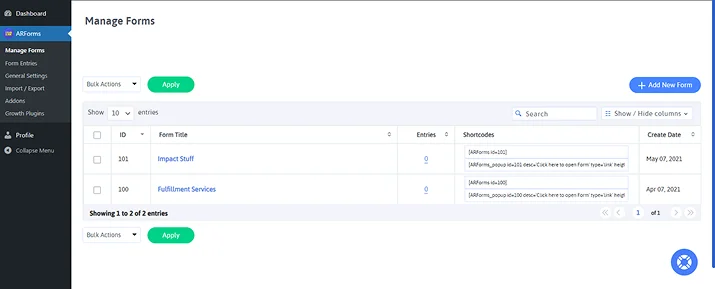
Firstly, go to “Manage Forms” → “Add New Form”. Now you’ll be redirected to ARForms live form editor where you can design your form the way you want.
However before that, you’ll see a popup modal box which showcases you the options for creating your new form.
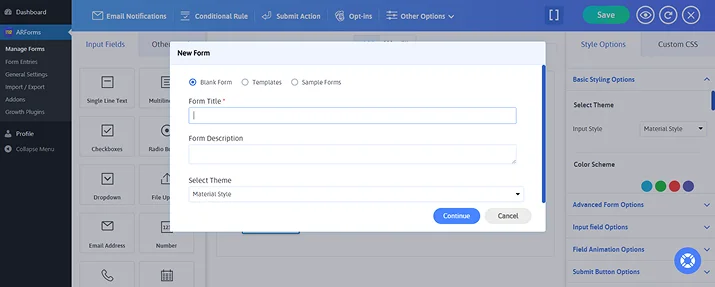
- Blank Form: Allows you to create your WordPress form from scratch.
- Templates: Just enter Form Title, Form description, select your theme and pre-built templates to get started.
- Sample Forms: With over 50+ well designed sample forms, just select whatever you like and continue.
For this, I’ll go with ARForms ready to use sample forms. That way, you can later customize using your CSS code.

Step 3: Open the Custom CSS Tab
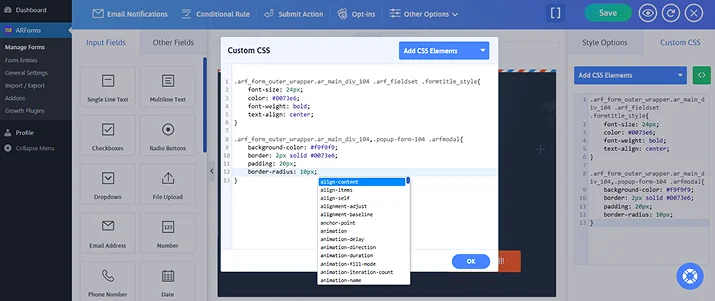
Now for adding custom CSS to your ARForms WordPress forms, you can easily look at the “Custom CSS” option in the right-side styling panel.

Just click on the “Custom CSS” tab inside the ARForms builder. From here, you can easily style your WordPress form the way you want.
As you can clearly see, it has a dropdown option named “Add CSS Elements”. Here you can add the existing CSS elements, setting the stage for you to add your custom CSS.

Step 4: Add Your Custom CSS
Now, it’s time to add your custom CSS.
As you can clearly see this is a subscription WordPress form which I have chosen from the wide range of 50+ sample forms of ARForms. Now suppose I like everything about its form except the way its title appears or I simply wish to change the forms outer wrapper.
Then simply click on the form element whose CSS you wish to customise.

Once you have selected the form elements you wanna customize with WordPress custom CSS. You’ll see some pre-written code for the selector. This makes styling form with css way more easy for beginners.
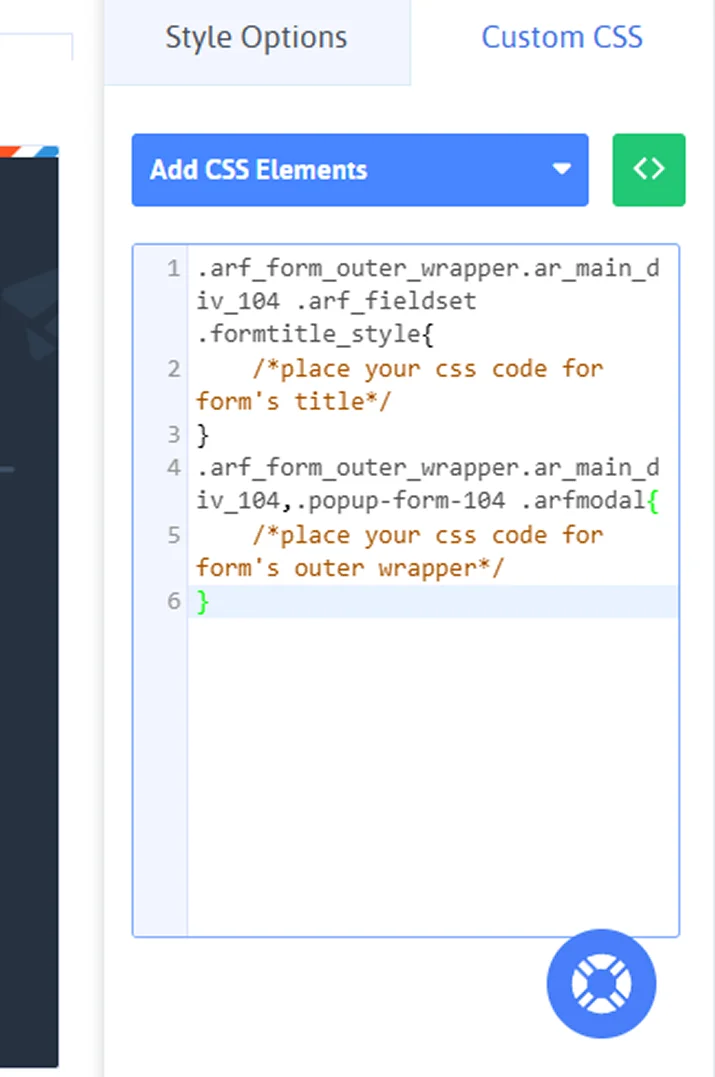
Now let us explain you what this pre-written code means in simple terms:
- “.arf_form_outer_wrapper.ar_main_div_104” targets the main form wrapper.
- “.arf_fieldset” targets the field container inside the form.
- “.formtitle_style” targets the title of your WordPress form.
Now all you have to do is add your custom CSS in the commented areas and save your form with css.
Step 5: Preview and Save
Last but not the least, save your custom CSS changes. Once saved, click on the eye icon to take a glance at the quick live preview of your form.

You can later adjust your custom CSS properties as you like. Plus, you can see how your forms appear across multiple devices too. Sounds amazing, right?
If yes, what are you waiting for? Go get the ARForms and add your custom CSS to WordPress forms, customizing them until you are happy!
Conclusion: Style WordPress Forms the Easy Way
Adding custom CSS to your WordPress forms can be a little tricky, but with the right tools and right methods, you can style your WordPress forms the way you want! To add custom CSS to WordPress forms, we have walked through multiple ways.
- WordPress customizer
- Child theme stylesheet
- CSS plugins
- And of course, our ARForms in-built CSS editor
So in conclusion, the easiest way to style your WordPress forms is using ARForms.
Not only is ARForms loaded with tons of premium styling options and ready to go templates, it also offers a way to add custom CSS to WordPress forms. Thus, get ARForms right away and start designing your WordPress forms the easy way.
You may also like:
- 8 Reasons You Should Use a Contact Form on Your Site
- How To Avoid Common Mistake When You Using Form Plugins
- How To Stop Contact Form Spam In WordPress
FAQs about Adding Custom CSS to WordPress Forms
How do I add custom CSS styles to WordPress?
To add custom CSS styles to WordPress, first you have to go to your WordPress dashboard. Next, you can add custom CSS via WordPress customizer. Or if you are a tech-savvy developer, you can use a child theme stylesheet to add custom CSS. You can also use any CSS plugin or use ARForms built-in CSS form editor which allows you to add custom CSS style to WordPress forms.
How do I add custom CSS to ARForms?
Once you have installed ARForms, simply create a new form or choose a ready made form template. Now inside the ARForms form editor, go to the Custom CSS tab and select the element you want to style. Lastly, add your custom CSS code and save the changes.
How to customize a WordPress form?
You can customize a WordPress form with the help of WordPress form builder plugins like ARForms. ARForms comes packed with multiple exclusive styling options, Custom CSS options and even 33+ advanced field forms. Best of all, ARForms has a friendly user interface with a simple drag and drop form builder.
Do you need coding skills to add custom CSS?
The simple answer is yes, but a little bit. You must need the basic CSS coding and how it works if you want to custom your forms with css. With ARForms, you can start directly by modifying the pre-written selectors and simply add your basic CSS changes. No need to write anything from scratch to add custom CSS.
Can I style individual fields in ARForms with custom CSS?
Yes, you can easily style individual fields in ARForms with custom CSS. Inside the Custom CSS tab, you can select the CSS elements you want to modify and you will get pre-written selectors for each form field such as buttons, labels, and many more.