Lead Forms vs Conversational Forms: Which One Should You Choose?


Not every form should look or behave like a traditional form.
A short contact form might only need a name, email, and message. But what happens when you need to ask visitors 10, 15, or even 20 questions?
This is where lead forms and conversational forms come in.
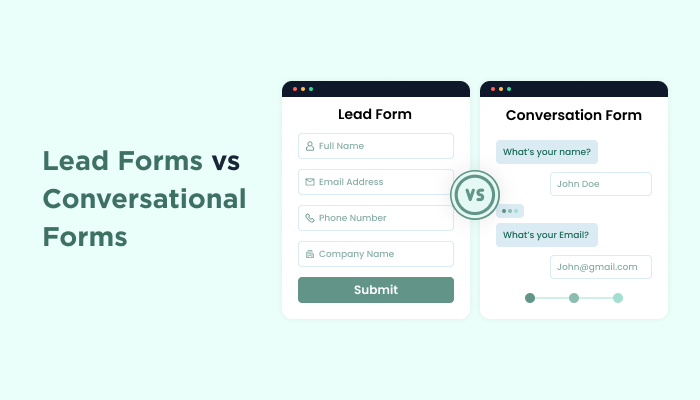
The lead forms make lead capture feel simple, and conversational forms break the experience into smaller, one-question-at-a-time interactions.
So which one should you choose? Let’s find out.
Lead Forms vs Conversational Forms at a Glance
In a hurry? No worries! Here’s a quick comparison of lead forms vs. conversational forms at a glance.
| Feature | Lead Forms | Conversational Forms |
| Form layout | Shows multiple fields together | Shows one question at a time |
| User experience | Simple and familiar | Interactive and guided |
| Best for | Short and medium length forms | Longer or interactive forms |
| Page context | Keeps surrounding page content visible | Puts the form experience front and center |
| Lead capture | Great for quick contact and lead capture | Useful for detailed lead qualification |
| Mobile experience | Works well for shorter forms | Can make longer forms easier to navigate |
| Traffic sources | Organic, service, and landing pages | Ads, email campaigns, quizzes, and dedicated campaigns |
| SEO | Works well when embedded in useful page content | Better suited to dedicated form experiences |
| Ideal use cases | Contact, quote, consultation, and signup forms | Surveys, quizzes, applications, and onboarding |
| Best choice when | Visitors need context before submitting | The form itself is the main experience |
What Are Lead Forms?

A lead form is a simple digital questionnaire that businesses use to collect contact details from people who are interested in their products or services.
Think of a lead form as the classic “tell us a little about yourself” form.
Name. Email. Phone number. Maybe a few questions about what the visitor needs. Simple.
Lead forms work best when the form is part of a bigger page. Your visitor can read about your service, check testimonials, understand the offer and then fill out the form without leaving the page.
For example if you’re running a web design agency, you might have a headline saying “Let’s Build Your Website,” a few portfolio examples, some client testimonials and a lead form asking for their name, email, budget and project details.
That’s exactly where WordPress lead generation forms make sense.
You can use ARForms, one of the most user friendly, drag and drop WordPress form plugins, to build these kinds of lead capture forms, then customize the fields and design to fit the rest of your WordPress website.
Lead Forms Work Best When:
- You need only a few important details.
- Your page content helps convince visitors to submit.
- You want the form to sit naturally inside a landing or service page.
- Visitors already know what they want.
- Speed and simplicity matter more than interaction.
What Are Conversational Forms?
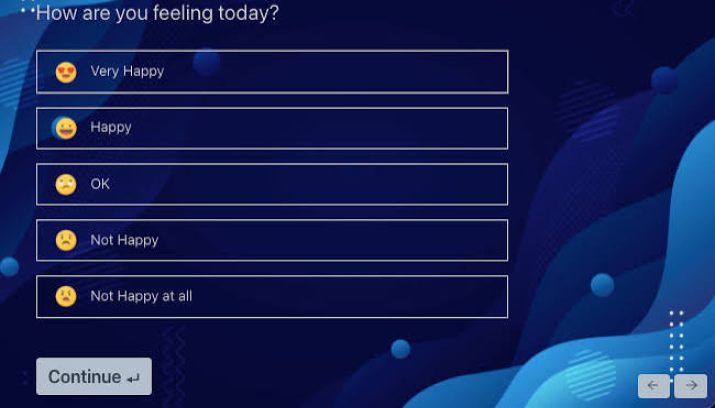
A conversational form is a simple digital questionnaire or data collection tool that businesses use to ask questions one at a time rather than showing a long page of boxes to fill out all at once.
Let’s imagine a form that didn’t show you all its questions at once. Instead, it asked:
What’s your name?
You answer.
What service are you interested in?
You answer.
What’s your approximate budget?
You answer.
That’s the basic idea behind a conversational form. It guides visitors through the form one question at a time. Thus the experience feels more like a conversation than filling out a traditional form.
This approach can be particularly useful for surveys, quizzes, lead qualification, applications, onboarding forms and other situations where you’re asking visitors several questions.
ARForms also lets you create conversational forms so you can turn a standard information-collection process into a more interactive experience when that’s a better fit for your audience.
Conversational Forms Work Best When :
- Your form has several questions.
- You want to collect information progressively.
- The form itself is the main focus of the page.
- You’re creating a quiz, survey, or application.
- You want to make a longer form feel less overwhelming.
Lead Forms vs Conversational Forms: Key Differences
At first look, the difference appears simple: one looks like a form, and the other feels like a conversation, but there’s more to the decision than appearance.
Let’s now look at the key differences.
1. Form Layout and User Experience

Lead forms give visitors a clear view of the fields they need to complete. They can scan the form, understand what’s a must-need and move through the fields at their own pace.
Conversational forms take the opposite approach. It shows one question at a time, not everything at once.
That difference can completely change how a WordPress form feels.
A three field contact form doesn’t need much hand holding because Visitors can see the fields, fill them out and move on. But imagine asking someone 15 questions on the same screen, and suddenly, that familiar form layout can feel like a lot of work.
A conversational format can break that experience into smaller, easier-to-digest steps.
2. Form Length
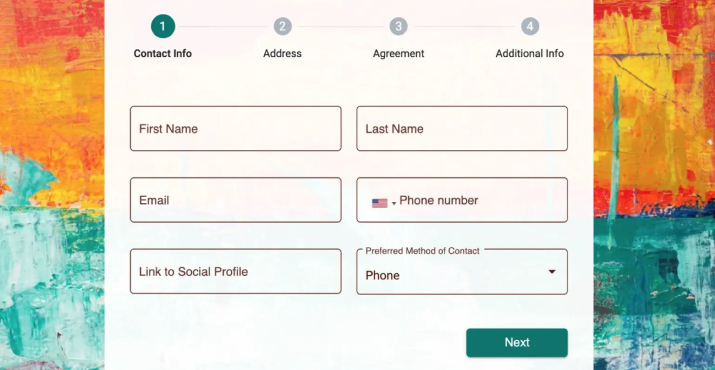
Form length is one of the easiest ways to decide between the two, but don’t treat the number of fields as a strict rule.
A short form asking for a name, email and message? A lead form is probably all you need.
A longer form asking about someone’s business, goals, budget, preferences and requirements? A conversational approach makes more sense.
But here’s the important part:
Ten easy questions aren’t necessarily more difficult than three complicated ones. Thus the real question isn’t just “How many fields does my form have?”, but it’s:
“How much effort does this form require from my visitor?”
If answering the questions feels like work, presenting them one at a time can make the experience feel more manageable.
3. Page Context

Here’s where the difference becomes even more particularly important.
Let’s say you’re building a service page. Then you’ve got:
- A strong headline
- Service benefits
- Customer testimonials
- Pricing
- Case studies
- FAQs
- A lead form
All of that content helps visitors decide whether they should contact you.
In this situation, a lead form fits naturally into the page. Visitors can read the content, build confidence in your offer and then lastly complete the form.
A conversational form, on the other hand, takes a different approach by putting the form experience at front and center.
That’s useful when the surrounding page doesn’t need much convincing. One of the best examples of this is when you’re sending someone directly to a survey, quiz or dedicated campaign.
So ask yourself,” Does my visitor need the page around the form?”
If yes, a lead form may be the better fit.
4. Lead Generation

Both lead forms and conversational forms can be used for lead generation. The difference is how you collect and qualify that lead.
Most of all simple lead capture form asks for:
Name → Email → Phone → Submit
That’s perfect when you just need someone’s contact details.
But what if your sales team needs more information before following up?
Then you gotta ask:
What service do you need? → What’s your budget? → When do you want to start? → What’s your company size? → What’s your email?
Thanks to WordPress form builder plugins like ARForms, you can even use features such as conditional logic to show relevant questions based on previous answers. That means your lead capture form doesn’t have to ask every visitor the same questions.
5. Mobile Experience

Online forms can feel very different on a desktop compared with a phone.
On a large screen, a visitor may have no problem looking at several fields at once. Yet on a smart phone, a long form can quickly turn into a lot of scrolling.
Conversational forms keep the visitor focused on one question at a time. But that doesn’t automatically make conversational forms the better mobile option.
If your form only asks for a name and email, making someone move through multiple steps could actually make the process slower.
For mobile users, the better question is, “What is the easiest way for this visitor to finish this particular form?”
For short forms, that may be a simple lead form.
For longer forms, a conversational experience may reduce the feeling of scrolling through a never ending list.
6. Traffic Source

Where your visitors come from can also influence which form format makes sense.
Organic Search
Visitors arriving through Google may need the surrounding page to understand your product or service before they’re ready to submit.
Lead Form → Often a good fit
Paid Ads
If you’re sending someone from an ad directly toward one specific action, you may want the form to become the main focus.
Conversational Form → Can be a good fit
Email Campaigns
If you’re asking subscribers to complete a survey or questionnaire, a conversational experience can make sense.
Social Media
Interactive campaigns, quizzes and lead qualification flows can work well with conversational forms. A simple inquiry may not need anything beyond a traditional lead form.
The key is to match the form with the visitor’s intent when they arrive, rather than choosing a format simply because it looks more modern.
7. SEO

If you’re choosing between lead forms and conversational forms based purely on SEO, don’t.
Neither form format automatically gives your page a ranking advantage.
Google cares much more about the overall quality and usefulness of the page including things like:
- Search intent
- Helpful content
- Page experience
- Performance
- Internal linking
- Relevant information
- Overall usability
For example if you’re trying to rank a service page, a lead form can sit naturally alongside useful info about that service. And a conversational form might make more sense for a quiz, survey or campaign where search rankings aren’t the primary goal.
Thus instead of asking, “Which form is better for SEO?”
Ask:
“Which form gives my visitors the better experience while supporting the purpose of this page?”
That’s the better way to make the decision.
8. Accessibility

Accessibility should never be an afterthought when picking an Online form format for your WordPress site.
No matter whether you’re using a traditional lead form or a conversational form, visitors should be able to understand what each question asks, navigate the form easily and recognize errors without confusion.
Thus pay attention to things like:
- Clear field labels
- Logical field order
- Keyboard navigation
- Easy-to-understand error messages
- Sufficient color contrast
- Clear instructions
Conversational forms can lower the amount of info a visitor has to process at once, and lead forms make the complete form structure visible right away.
Neither format is automatically more accessible. The implementation matters more than the format itself.
That’s exactly why using ARForms makes sense. It doesn’t matter whether you opt for WordPress conversational form or lead form, this WordPress form plugin lets you create every online form with ease.
Lead Forms: Pros and Cons
After looking at how lead forms work, their biggest advantage is pretty clear: they keep the path to submission simple.
Visitors can see what information you need, understand how much is left to complete and submit the form without having to move through multiple screens. They’re especially useful when the form sits alongside content that helps visitors make their decision.
But that simplicity can work against you when the form gets too long.
| Pros | Cons |
| Easy for visitors to understand | Long forms can feel overwhelming |
| Quick for short forms | More scrolling on smaller screens |
| Works well with surrounding page content | Many fields can make the form look busy |
| Familiar form filling experience | Less engaging for interactive use cases |
ARForms can be useful here when you want more control over how much your lead generation form collects. You can now start with a simple form and add features such as conditional logic or multi step forms when your requirements grow.
Conversational Forms: Pros and Cons
Conversational forms solve a different problem.
Rather than asking visitors to deal with the complete form at once, they break the experience into smaller questions. This makes the long questionnaire feel much less like a homework assignment.
The trade off is that this approach isn’t automatically better for every form. If someone only needs to fill in their name and email, taking them through multiple steps could actually add friction.
| Pros | Cons |
| Keeps attention on one question | Can be unnecessary for short forms |
| Makes longer forms feel easier to approach | Adds more steps to the process |
| Creates a more interactive experience | Gives less visibility into the full form |
| Works well for quizzes and surveys | Not ideal when page context is important |
ARForms here also gives you the option to use a conversational approach so you can decide whether a traditional or question-by-question experience makes more sense for each form.
Lead Forms vs Conversational Forms: Real-World Examples
So far, we’ve looked at the differences in theory but what happens when you apply them to an actual website?
This is exactly where the choice becomes much easier.
Let’s say someone has landed on your “Request a Quote” page. They’ve read about your service, looked at your work and checked your testimonials. At this point, asking them for their name, email, phone number and project details in a traditional lead form makes sense.
However, now let’s say you’re asking the same visitor to answer 12 questions about their business, budget, goals, preferences and timeline. Showing all of those fields together could make the form feel like a chore, making anyone’s head spin. Thus a conversational format would likely be a better experience here.
| Use Case | Better Fit | Why It Works |
| Contact form | Lead Form. | Best when visitors only need to provide basic contact details. |
| Quote request | Lead Form. | Keeps the form alongside service information that helps visitors make a decision. |
| Consultation request | Lead Form. | Works well when visitors can review your services before submitting their details. |
| Newsletter signup | Lead Form. | Ideal for collecting a name and email with minimal effort. |
| Customer survey | Conversational Form. | Makes multiple questions easier to complete one at a time. |
| Personality quiz | Conversational Form. | Creates a more interactive question-by-question experience. |
| Lead qualification | Conversational Form. | Lets you collect and qualify visitor information progressively. |
| Client onboarding | Conversational Form. | Helps break a detailed onboarding process into smaller steps. |
| Job application | Conversational Form. | Makes a longer application feel less overwhelming by showing questions in a progressive way. |
| Product recommendation quiz | Conversational Form. | Guides visitors through questions to help identify the right product or service. |
| Event registration | Lead Form. | Works well when registration only requires a few essential details. |
| Service questionnaire | Conversational Form. | Useful when you need detailed information before providing a service or quote. |
And notice something important: there isn’t a permanent winner.
The same website can benefit from both. A business might use a lead form on its contact page, a conversational form for a qualification quiz and another type of form for client onboarding.
The better question isn’t “Which form is better?”. but is “Which experience makes the most sense for this particular form?”
Can You Use Both Lead Forms and Conversational Forms?
Yes. In fact, you don’t have to choose one format for your complete WordPress website.
Different forms can serve different purposes. You can use a simple lead form on your contact page, while a quiz, survey or detailed onboarding form works better as a conversational form.
The best part? ARForms supports both approaches. Thus you can pick the WordPress form type based on what each form needs rather than using the same experience everywhere.
How to Choose the Right Form for Your WordPress Website

Still deciding between the two? Don’t overthink it. Just look at what you’re asking your visitors to do.
Thus ask yourself these 6 questions to choose the right online form for your WordPress site:
1. Is the form short or long?
Short → Lead Form
Long → Consider a Conversational Form
A short form rarely needs a complex interaction. If you’re only asking for a name, email and message, keep it simple.
On the flip side, for longer forms, showing one question at a time can make the experience feel more manageable.
2. Does the surrounding page help sell the offer?
Yes → Lead Form
If visitors need your headlines, benefits, testimonials, pricing or other content before they’re ready to submit, keep the form connected to that page.
3. Is the form itself the main experience?
Yes → Conversational Form
Sending visitors to complete a quiz, survey, application or questionnaire? Then there’s less need for other page content competing for their attention.
4. Are you collecting information progressively?
Yes → Conversational Form
Suppose the later questions depend on earlier answers or you want to gradually collect more information, a conversational format can make that process feel like a piece of cake.
5. Does the visitor need context before submitting?
Yes → Lead Form
If someone wants to understand your service, see your pricing, read testimonials or learn about your offer before filling out the form, an embedded lead generation form takes the spotlight.
6. Is the form part of a dedicated campaign?
Often → Conversational Form
A dedicated campaign, email promotion or paid ad will send visitors directly to a specific form. Thus in situations like this, a focused conversational experience can work well, particularly when the form contains several questions.
It All Comes Down to Your Form
In a nutshell, lead forms vs. conversational forms is a long debate, and the right answer is different for everyone.
If you want visitors to see, understand and quickly complete the form, start with a Lead Form.
If you want visitors to move through a series of questions as part of the experience, consider a Conversational Form.
Using ARForms, you can create both types of form experiences and pick what works best for each page, campaign or audience. From simple lead capture forms to more interactive conversational forms, you have the flexibility to create forms around your conversion goals easily with just a simple drag and drop.
Ready to create forms that fit the way your visitors actually interact? Try ARForms and build your next WordPress form today.
You may also like
- How to Automate Lead Management with WordPress AI Agent
- 7 Best WordPress LMS Plugins For Course Creation in 2026
- How to Create a Sponsorship Form in WordPress for Events or Sponsor
FAQs
What are conversational forms?
Conversational forms are a type of online forms which are used for data collection, and show questions one at a time in a friendly, chat-like style.
What does lead form mean?
A lead form means an online form which is used to collect contact details from potential customers. People fill it to share their basic information because businesses offer something valuable in return, be it a free guide, webinar registration or product demo.
Are conversational forms better than lead forms?
Yes, in most scenarios, conversational forms are considered better than lead forms to get better engagement and lead quality. However, lead forms are still better for speed and simplicity.
Which is better for lead generation?
None of the formats is better than the other; conversational form mostly win for higher completion rates and lead quality on longer form, traditional lead forms win for their speed and high-intent, short interactions.