
How to Create a Sponsorship Form in WordPress for Events or Sponsor


Want to attract more sponsors for your event? Then all you need is an online sponsorship form on our WordPress site.
Finding sponsors is hard enough. Managing them shouldn’t be.
Many event organizers still handle sponsorship requests through:
- Emails.
- Phone Calls.
- Spreadsheets.
- PDF Proposals.
But that mostly leads to missing information, delayed replies, and a lot of manual work.
A simple solution is to create a sponsorship form on your WordPress website.
With a well structured form, sponsors can submit their details, choose sponsorship packages and send payments without endless back-and-forth emails.
Read on to learn how to create a sponsorship form in WordPress. Plus, we’ll also show you:
- Why using an online sponsorship form is better.
- What information to collect in a sponsor form.
- How to set it up quickly using a powerful form builder.
Let’s GO!
What Is a Sponsorship Form?
A sponsorship form is a document or online form that is used to collect information and commitments from individuals or organisations that they’re willing to support an event.
In other words, it is a formal “Will you help us?” document or online form.
It lists what the organizer of event (You) needs, be it money or items, and what the helper (sponsor) gets in return (Such as their logo on a banner or a thank-you shoutout)
Why Sponsorship Forms Are Important for Events and Partnerships
Sponsorship forms transform verbal agreements into legal binding.
Thus you can say it is more of an agreement between two parties. Here, you request a company or individual for funds and in return, you put their company’s name and logo around for advertisement.
For example, let’s say there’s a local youth soccer team, the “Haripar Hawks”, who needs new jerseys and funds to travel to a tournament. But, they don’t have money.
And here’s where sponsorship forms come to the rescue.
They put on their sports event sponsorship form on their websites and ask nearby local businesses to sponsor them with $500.
Now, here your online sponsor form plays a crucial role. It will explain the goal and states that if the local business pays $500, the Hawks will put their business logo on their new jerseys.
It’s a win-win for both. The team gets the fund and businesses get advertised.
In a nutshell, online sponsorship forms are important for events and partnerships as they’re efficient for:
- Legally binding
- Data collection
- Broader reach
- Professional automation
- Risk reduction
Key Information Every Sponsorship Form Should Collect
Here comes the main part of the Sponsorship form – collecting information.
Now since your sponsor form is gonna act as your legal finding, it can’t be a listing of random form fields. Everything has to be in order and logically organized.
Thus look below at the key information every sponsorship form should collect:
Basic Sponsor Information
- Sponsor name
- Company name
- Contact email
- Phone number
Sponsorship Details
- Sponsorship tier
- Sponsorship goals or message
- Website or social media links
- Branding Assets
Company logo upload
- Marketing materials
- Payment Information
- Sponsorship fee selection
- payment method
How to Create a Sponsorship Form in WordPress (Step-by-Step)
Step 1: Install and Activate ARForms
To create a sponsorship form in WordPress, first you have to install and activate ARForms.
And the reason why we’re using ARForms, and not any random form plugin is simple: ARForms is the best WordPress form builder plugin. You can create professional online forms for WordPress with zero coding.
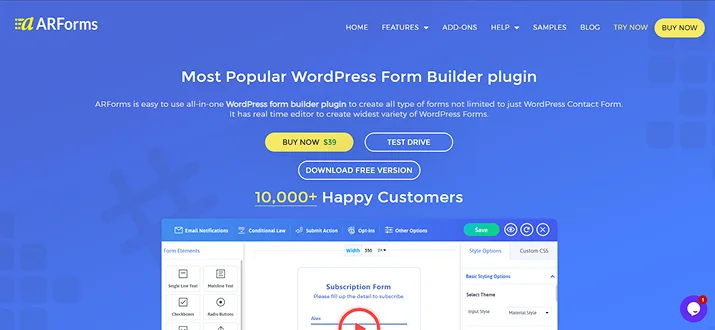
Moreover, it comes with a simple drag-and-drop interface, making it easy to design a WordPress sponsorship form in just a few minutes.
Here are some reasons why ARForms is a great choice for creating sponsorship forms:
- Over 50+ ready-to-go sample forms & templates.
- 33+ advanced form fields.
- Powerful conditional logic and math calculations.
- 24+ third-party integrations.
- Flexible styling and design options.
- Option to embed media like YouTube videos.
- Autosave form progress.
- Easy form entry management.
- And a lot more!
So now that you got the whole picture of ARForms, let’s spare a quick look on how to install and activate it:
- First of all, go to the ARForms official website and download your preferred version. (It also got a free version to get started)
- Next, go to your WordPress dashboard → Plugins → Add new, and simply upload the ARForms zip file
- Now hit “Install Now”, followed by “Activate”.
That’s it!
Although not possible, still if you get stuck somewhere, you can always check the official ARForms user friendly guide.
Step 2: Create a New Sponsorship Form
Now that our ARForms is activated, let’s make your first WordPress sponsorship form, which is quite simple.
First things first, head over to ARForms → Manage Forms → Add New Forms.
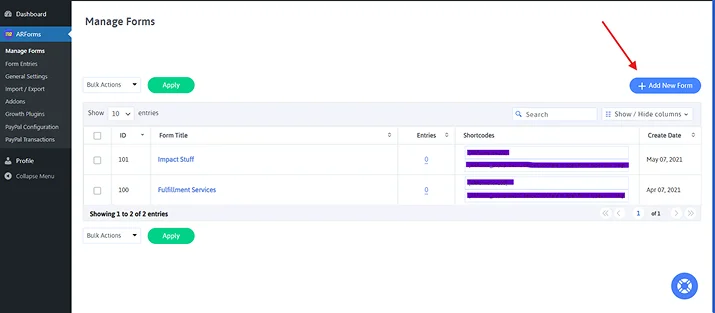
After clicking on “Add New Form”, you’ll be redirected to ARForms live form builder. But before jumping straight on, you’ll see a popup.
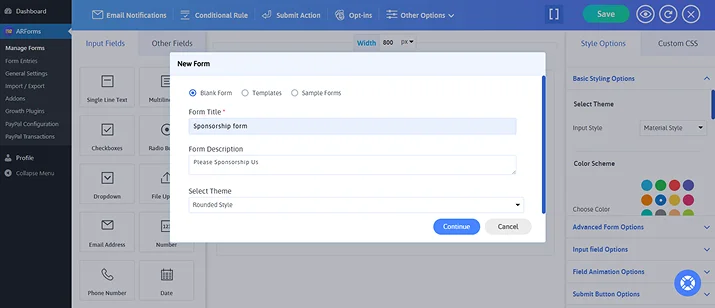
Here you just have to set your:
- Form Title
- Form Description
- Select Theme
Then click on “Continue”. And now you can see your new online form.
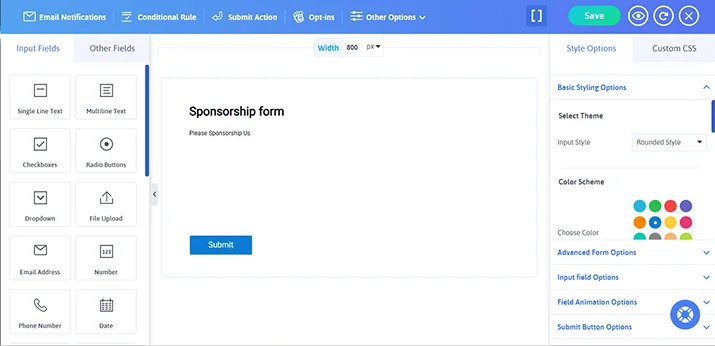
However, there’s one thing this sponsorship form is lacking which is form fields and styling.
Step 3: Add Important Sponsorship Form Fields & Customize
Here comes the most important part of your sponsorship form in WordPress: adding form fields.
And for arranging these form fields in the right order as we talked, all it takes is a simple drag and drop. Plus, one more thing before getting started, you can create multi-page sponsor forms too.
Add Basic Sponsor Information Fields
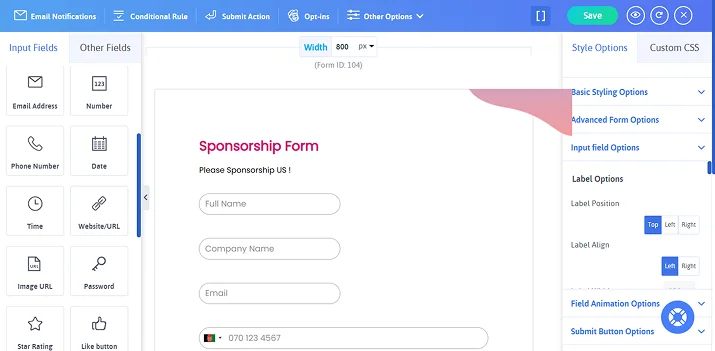
Start by adding the essential contact fields so you know who the sponsor is and how to reach them.
Drag the following fields into your form:
- Full Name..
- Company Name.
- Email Address.
- Phone Number.
This basic information allows you to identify sponsors and communicate with them easily.
Add Sponsorship Details
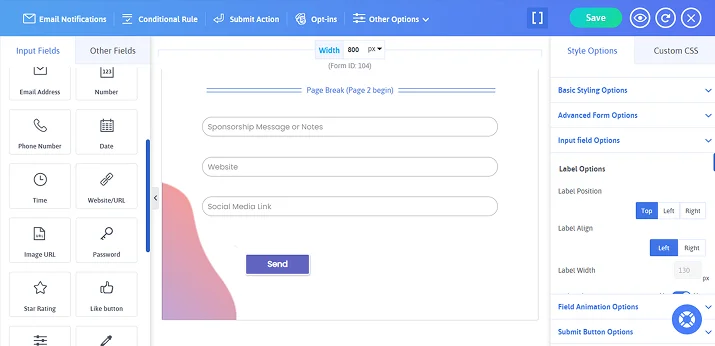
Next, add fields that collect information about the sponsor’s goals and promotional ways:
- Sponsorship Message or Notes.
- Website URL.
- Social Media Links.
These details help you understand how sponsors want their brand to appear during the event.
Add Branding Asset Upload
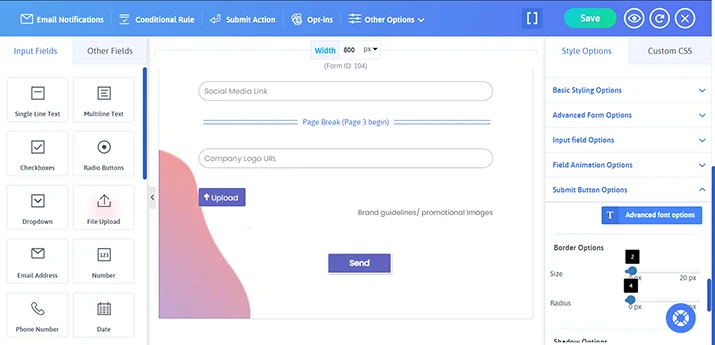
Many sponsors want their logo or marketing materials shown during the event. Thus to collect these assets, add a File Upload field where sponsors can submit:
- Company logo.
- Brand guidelines.
- Promotional images or marketing files.
This saves time later when preparing banners, websites, or promotional materials.
Add Sponsorship Tier Selection
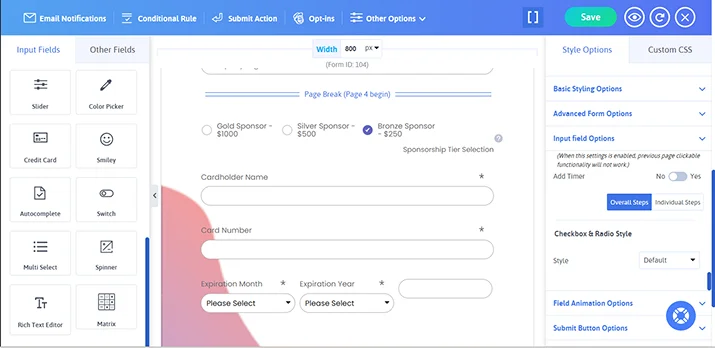
Most events offer different sponsorship packages such as Gold, Silver or Bronze.
So for letting your sponsors choose their preferred option, add a Radio Button or Dropdown field labeled “Select Sponsorship Package”.Furthermore, you can also add a form field for collecting sponsor card details or payment info.
| Sponsorship Tier | Example Benefits |
| Gold Sponsor – $1000 | Logo on banners, website features, social media promotion. |
| Silver Sponsor – $500 | Logo on event page, newsletter mention. |
| Bronze Sponsor – $250 | Logo in sponsor section. |
Customize
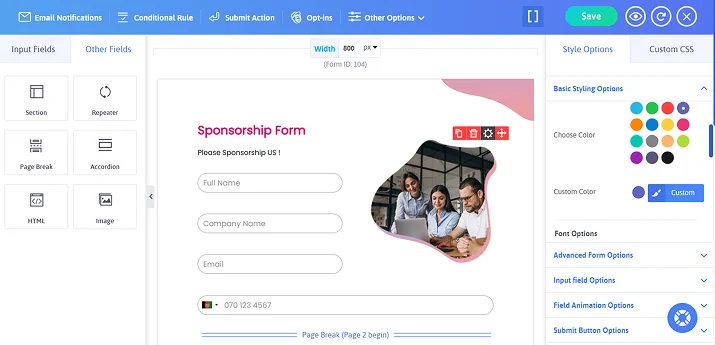
In the end, just see how amazingly your WordPress sponsorship form will start looking more complete and professional. However, don’t forget to add a touch of personalization with ARForms extensive styling options, you get:
- Trendy material designs .
- 15 color schemes.
- Quick live preview (See how your form works across mobile, tablet and PC)
- Font Awesome Icons .
- Custom CSS.
- and many more!
Step 4: Add Payment Options for Sponsors & Configure Notifications
At this stage, your WordPress sponsorship form is almost complete. Yes, almost! because now we have to set up a payment method to let your sponsor pay online. Plus make sure they get a confirmation notification when a sponsorship form is submitted.
So for adding online payment options such as PayPal, you have to first configure it. So if you haven’t activated any of ARForms payment gateway integrations, do it now!
After configuring your payment gateway, simply go back to your form and add a Payment field such as:
- PayPal
- Stripe
- Credit Card
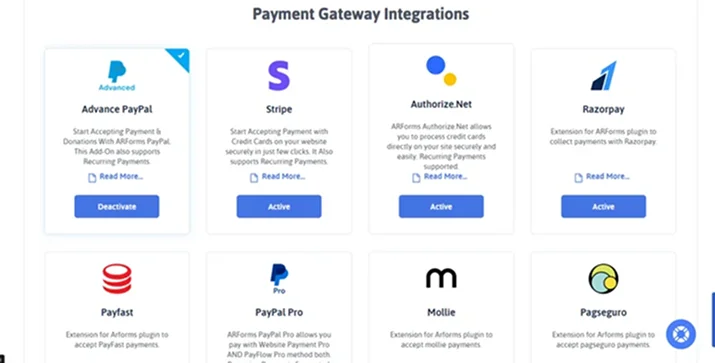
The best part is you can also link the payment amount to the Sponsorship Tier field you created earlier.
This lets all your sponsors select a package and complete the payment right away.
After payment comes confirmation. The next step is setting up notifications so you never miss a sponsor submission.
Inside ARForms, go to Manage Forms→ Edit Form (Sponsorship form) → Email Notifications, and simply tick on: Send an automatic response to users after form submission.
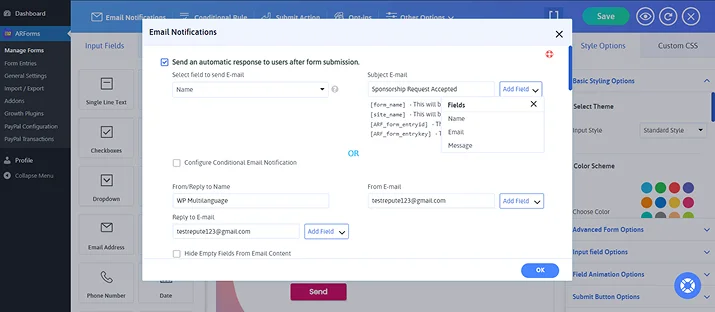
That’s all! Now all your sponsors who filled the form will get an email sent to them. The best part is you can also personalize these emails.
You should also send a confirmation email to yourself. This reassures them that their sponsorship request was received successfully to you.
A typical confirmation message may include:
- Thank you message.
- Sponsorship tier selected.
- Payment confirmation.
- Next steps or contact details.
Step 5: Embed the Sponsorship Form on Your WordPress Site
Finally! Your sponsorship form is ready to be set on your WordPress site, and accept sponsors.
All you have to do is simply copy the short code of your sponsorship form and paste it in your WordPress website. And now your sponsorship form is created and added to your site successfully.
Conclusion
Create a sponsorship form to simplify your sponsorship management.
A sponsor form on your WordPress site lets you accept sponsorship and payment online as well as collect data in a structured and organised way. And with ARForms by your side, collecting sponsorships is way easier than before.
So what are you waiting for? Get ARForms today, and build your sponsorship form!
You may also like:
- 9 Impressive Things ARForms WordPress Form Builder Plugin Bestows
- A Useful Guide for Setting Conditional Logic in WordPress forms
- What are Lead Forms? Ultimate Guide to Lead Generation Forms
FAQs
What is a sponsorship form?
A sponsorship form is a document or online form that is used to collect information and commitments from individuals or organisations that they’re willing to support an event.
Can I create forms on WordPress?
Yes, you can easily create forms on WordPress by using form builder plugins like ARForms. You simply have to drag and drop the form fields you want in your form, style it with extensive styling options
What form is used for sponsorship?
A sponsorship form is used for accepting sponsorships for events and partnership between two organizations or parties.
How to make a sponsor form?
You can make a sponsor form for your WordPress site by using ARForms WordPress form plugin. This plugin comes with over 33+ advanced form fields, 50+ sample forms and extensive styling options.